


Spreadsheet alternatives for agencies are purpose-built tools that replace the manual tracking, time logging, and client management that agencies try to do in Google Sheets or Excel. When 88% of spreadsheets contain errors (Ray Panko, MarketWatch) and agencies run on roughly 10% net margins, the cost of sticking with spreadsheets too long is real, even if it's invisible.
I'm going to be honest with you: I defended spreadsheets for way too long.
When I was running a two-client agency, my Google Sheet was beautiful. Color-coded tabs for each client. A time log with formulas that auto-calculated billable hours. A task tracker that I updated religiously every morning with my coffee. It was elegant. Free. And I could find anything in under ten seconds.
Then I added a third client. Then a fourth. And that beautiful spreadsheet turned into the thing I dreaded opening more than my inbox.
But I kept using it. Because switching to "real software" felt like admitting I couldn't handle my own business. Like I needed training wheels. Every agency management tool I looked at was built for teams of 50 with dedicated project managers and sprint planners. I didn't need that. I just needed my sheet to stop breaking.
Here's the thing most agency owners won't admit: the spreadsheet isn't failing because you're bad at spreadsheets. It's failing because spreadsheets were never designed to run a business. And the longer you pretend otherwise, the more money you're quietly losing.
## How big is the spreadsheet error problem?
Spreadsheet errors affect 88% of all spreadsheets, according to research by Ray Panko as cited by MarketWatch. Let me hit you with a number that should make you uncomfortable.
As I covered in piece on agency project management, this isn't just an amateur problem. Norway's $1.5 trillion sovereign wealth fund lost $92 million from an incorrect date entry. JP Morgan's London Whale disaster was partly caused by a formula that divided by a sum instead of an average. TransAlta took a $24 million charge because of a cut-and-paste error. Goldman Sachs overstated an equity value by $100 million in a spreadsheet used for a deal with Tibco.
And here's one that hits closer to home than Wall Street: in 2020, UK Public Health England failed to report 16,000 Covid test results because they were using an Excel format that maxed out at 65,536 rows. Real data. Real consequences. From a spreadsheet.
Bad data costs the U.S. economy $3 trillion per year, according to Thomas Redman writing in Harvard Business Review. Three trillion. And while your agency's spreadsheet errors aren't costing billions, they don't need to. When the average agency net profit margin sits around 10% (Parakeeto, 2024), a few missed billable hours, one misquoted retainer, or a copy-paste error on an invoice is enough to wipe out your margin on a client for the entire month.
That's the part nobody tells you. You don't need a catastrophic failure for spreadsheets to cost you real money. The damage is slow and invisible.
What is the spreadsheet tax and how much does it cost?
The spreadsheet tax is every minute you spend maintaining, updating, cross-referencing, reformatting, and fixing your spreadsheets that never appears on a client invoice. I coined this term in the pillar article, and I want to dig deeper here because it's the thing that actually kills agencies. Not bugs. Not formula errors. The tax. Time that doesn't generate revenue. Time you spend to support the system that's supposed to be supporting you.
This was my spreadsheet tax at four clients:
- 20 minutes every morning updating task statuses across four tabs
- 15 minutes copying client requests from email and Slack into the sheet
- 30 minutes on Friday reconstructing time entries I'd forgotten to log
- 10 minutes fixing a formula that broke because I inserted a row in the wrong place
- 45 minutes at the end of the month pulling together a "report" for a client that was really just a filtered view of my own messy data
That's roughly two hours a day. Ten hours a week. According to Parakeeto, agencies lose 10-20% of gross margin annually to non-billable time. My spreadsheet tax was feeding that drain every single week, and I didn't even categorize it as a problem. I categorized it as "just running my business."
Think about it: if you're spending 20% of your work time looking for information (McKinsey's number, not mine), and another 28% of your week managing email, your spreadsheet isn't saving you time. It's consuming the time you could be using to do actual billable work.
And when the time tracking falls apart, the billing disputes aren't far behind. No accurate time log means no proof when a client questions your invoice. The spreadsheet tax doesn't just eat your hours. It undermines your ability to get paid for them.
Collaboration technologies, according to McKinsey, could reduce time spent searching for information by 35%. That's not a marginal improvement. For a solo operator billing $150 an hour, that's thousands of dollars a month you're leaving on the table.
When do spreadsheets still make sense for agencies?
Spreadsheets are genuinely the right call when you have one or two clients with stable scopes, you're in your first six months, your budget is tight, or you're disciplined about daily updates. I'm not here to tell you to throw away your spreadsheet tomorrow. That would be dishonest, and it wouldn't serve you.
Here's when spreadsheets are genuinely the right call:
- You have one or two clients with stable scopes. If your workload is predictable, your clients don't change requests frequently, and you can update your tracking in under 15 minutes a day, keep the spreadsheet. Don't fix what isn't broken.
- You're in your first six months. You're still figuring out your process. Paying for software before you know your own workflow is like buying furniture before you've seen the apartment. Use the spreadsheet to learn what you actually need to track.
- Your budget is genuinely tight. If you're bootstrapping and every dollar matters, a free Google Sheet beats a $30/month tool you'll resent paying for. No shame in that. 44% of project managers use no software at all, according to PwC. You're in very large company.
- You're disciplined about daily updates. If you log time as you go, update tasks in real-time, and never let the sheet get more than a day stale, you can stretch it further than most people. The spreadsheet doesn't fail disciplined people. It fails the rest of us.
And I mean genuinely. Be honest with yourself. Because most agency owners who say "it's fine" are already past the breaking point and just haven't admitted it yet.
When should your agency stop using spreadsheets?
Your spreadsheet becomes sabotage when you're losing billable hours to memory-based time logging, missing client requests because they didn't get copied into the sheet, or spending more time maintaining your tracking system than it saves you. Let's get real. There's a line between "scrappy and resourceful" and "actively hurting your business." Most agency owners cross it without noticing.
Only 2.5% of companies complete 100% of their projects successfully (PwC). And 77% of high-performing projects use project management software (Hive). Meanwhile, only 22% of organizations use PM software at all (Wellingtone). The correlation isn't a coincidence.
But forget the stats for a second. Here are the breaking points I've hit myself and heard from dozens of other agency operators:
- Lost billable hours.You finished a two-hour task for Client B on Wednesday. By the time you sat down to update your time log on Friday, you remembered it as maybe an hour. Maybe an hour and a half. That's $75-150 in revenue that just evaporated. Multiply that by every task, every week, every client. According to the HBR/AffinityLive study, each professional services worker loses $50,000 per year in revenue from poor time tracking. Your spreadsheet isn't the only cause, but it's enabling the problem.
- Missed deadlines from missed requests. A client emailed a revision request on Tuesday. You meant to copy it into the spreadsheet but got pulled into a call. By Thursday the client is asking where their revision is. You scramble. They notice. Trust erodes. It won't show up on any dashboard, but it quietly poisons a relationship.
- Client confusion from version chaos. You sent the client a report from your spreadsheet last month. Then you restructured your tabs. Now the numbers don't match because you changed a formula. The client doesn't understand your spreadsheet. They don't trust your spreadsheet. And now they're questioning your invoices. As I covered in the agency project management article, if a client disputes your hours and all you have is a self-reported spreadsheet, you've already lost that argument.
- Mental exhaustion from context maintenance. This is the one nobody talks about. Keeping a complex spreadsheet accurate across multiple clients is cognitively draining. You carry the mental load of remembering what needs updating, what might be wrong, what you forgot to log yesterday. Organizations using proven project management practices waste 28 times less money according to CIO. The tools aren't magic — the people using them just aren't burning mental energy on system maintenance.
- The "I don't need another tool" trap. Real talk: saying "I don't need another tool" is sometimes wisdom and sometimes ego. The average company manages 305 SaaS applications (Zylo, 2025), and 46% of those licenses go wasted. So the skepticism is justified. But using that valid concern as an excuse to stick with something that's actively costing you money? That's stubbornness dressed up as strategy.
What should agencies actually replace spreadsheets with?
The right spreadsheet replacement handles multi-channel client requests, tracks time alongside the work (not in a separate app), creates proof of work with timestamps and audit trails, and doesn't cost a fortune. This is where most "alternatives" articles lose me. They list 15 tools with feature comparisons and pricing tables, and none of them acknowledge that the problem was never features. The problem was always fit.
50% of respondents in the Wellingtone survey spend one or more full days just manually collating project reports. That's the kind of waste you're trying to eliminate. So the replacement needs to do a few things well, not everything poorly.
What your replacement actually needs to do:
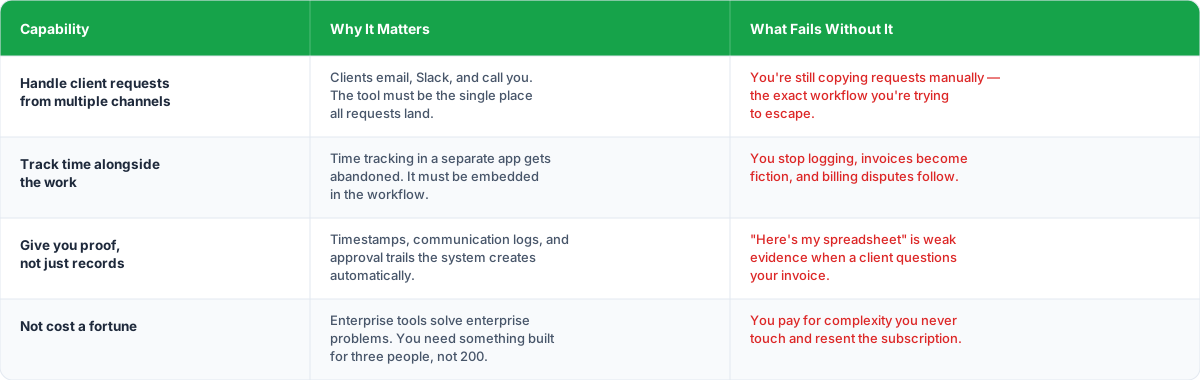
- Handle client requests from multiple channels. If your clients email, Slack, and call you (and they do), the tool needs to be the single place where all of that lands. Copying requests from email into a spreadsheet is the exact workflow you're trying to escape. (I go deep on this in the piece on request management.)
- Track time alongside the work. The biggest reason agencies don't track time accurately is that the time tracker lives somewhere separate from the task. You do the work in one place, log the time in another, and eventually you stop logging. Time tracking should be embedded in the workflow, not bolted on. (More on that in the time tracking deep dive.)
- Give you proof, not just records. When a client questions an invoice, "here's my spreadsheet" is weak. You need timestamps, communication logs, approval trails. Documentation that exists because the system creates it, not because you remembered to type something into a cell.
- Not cost you a fortune. Only 30% of employees feel they have the correct tools for their work (Productiv). Part of that is because organizations buy enterprise tools for small-team problems. You don't need a platform built for 200 people. You need one that fits three.
That's the gap Sagely was built to fill. Client communication, request management, time tracking, and retainer oversight in a single platform designed for solo operators and small agency teams. Because you need to replace three or four of the tools you already have with one that actually works the way your agency does.
I built Sagely because I hit every single breaking point on this list and realized the tool I needed didn't exist. That's the origin story, not a pitch.
How to decide when to switch from spreadsheets to software
I'm not going to tell you to switch tools because it's trendy. I'm going to give you a framework for deciding when it's time.
Stay with your spreadsheet if:
- You have fewer than three active clients
- Your clients communicate through one channel (usually email)
- You can honestly say you haven't missed a request or lost billable time in the last 90 days
- Your spreadsheet tax is under 30 minutes a day
Start looking for alternatives if:
- You have three or more active clients sending requests through multiple channels
- You've caught yourself saying "sorry, that fell through the cracks" to a client in the last month
- You're logging time after the fact and you know the numbers aren't accurate
- You've had a client dispute hours or question an invoice
- You spend more time maintaining your tracking system than it saves you
- You have multiple versions of your spreadsheet and you're not sure which is current
Move now if:
- You've lost revenue because of tracking failures (missed time, missed requests, missed deadlines)
- A client relationship has been damaged by communication gaps your system failed to prevent
- You're working nights and weekends, and a significant chunk of that time is admin, not client work
- You feel genuine dread when you open your spreadsheet
The progression between 2017 and 2018 tells the story: spreadsheet usage for agile projects dropped from 74% to 67% in just one year (VersionOne). People are figuring this out. The question is whether you figure it out before or after it costs you a client.
So what do you do
Spreadsheets are a perfectly good starting point. They're free and familiar. But they're a starting point, not a destination.
The real cost of sticking with a spreadsheet too long isn't a catastrophic failure. It's the slow bleed. The hours you didn't bill and the requests you didn't catch. The trust you lost because your system couldn't keep up.
You don't need 305 SaaS applications.
You don't need enterprise software that takes a month to set up. You need a system that matches how your agency actually works: multiple clients, multiple channels, constant context-switching, and razor-thin margins that can't absorb inefficiency. (For a full breakdown of what your tool stack should actually look like, check out the piece on tool stack optimization.)
Build the system first, then find the tool that supports it. And when the spreadsheet tax starts costing more than the alternative, make the switch. Not because someone told you to. Because the math doesn't lie.
Find out if you've outgrown your spreadsheet →
Frequently asked questions about spreadsheet alternatives for agencies
Why do spreadsheets fail agencies?
Research shows 88% of spreadsheets contain errors (Ray Panko, MarketWatch). For agencies, the failure isn't dramatic: it's the daily "spreadsheet tax" of manually updating, cross-referencing, and fixing formulas. This non-billable time eats into revenue, causes missed requests, and produces inaccurate invoices that lead to client disputes.
When should an agency switch from spreadsheets to software?
Switch when you have three or more active clients using multiple communication channels, you've missed requests or lost billable time in the past 90 days, you're logging time after the fact, a client has disputed your hours, or you spend more time maintaining your spreadsheet than it saves you.
What is the spreadsheet tax for agencies?
The spreadsheet tax is every minute spent maintaining, updating, cross-referencing, and fixing spreadsheets that never appears on a client invoice. For a typical four-client agency, this can reach two hours per day, or ten hours per week, of non-billable time feeding a system that's supposed to be supporting you.
When are spreadsheets still the right choice for agencies?
Spreadsheets work well when you have one or two clients with stable scopes, you're in your first six months and still defining your process, your budget is genuinely tight, or you're disciplined enough to update daily. Be honest with yourself about whether that last point is actually true.
What should an agency replace spreadsheets with?
The replacement needs to handle multi-channel client requests, track time alongside the work (not in a separate app), create proof of work with timestamps and audit trails, and cost less than enterprise solutions. Consolidation into fewer tools beats collecting more specialized ones.
How much do spreadsheet errors cost businesses?
Bad data costs the U.S. economy $3 trillion per year (Thomas Redman, Harvard Business Review). For agencies with 10% net margins (Parakeeto, 2024), a few missed billable hours, a misquoted retainer, or one copy-paste error on an invoice can wipe out an entire month's profit on a client.