


Agency time tracking is the practice of logging billable hours in real time, rather than reconstructing them from memory. Professional services workers lose roughly $50,000 per year in revenue from poor time tracking (Harvard Business Review/AffinityLive). For small agencies running on 10% margins, the gap between what you work and what you bill is where your profit goes to die.
It's 4:30 on a Friday afternoon. You've got one tab open with a blank spreadsheet and another with your calendar, trying to reverse-engineer what you actually did this week.
Tuesday is a blur. You're pretty sure you worked on Client B's landing page revisions, but was that Tuesday or Wednesday? There was definitely a Slack call with Client A somewhere in there. Thirty minutes? Forty-five? And that email thread where Client C kept changing the headline copy, did you log that? Of course you didn't. You never log email time.
So you start guessing. Rounding up here, rounding down there, filling in numbers that feel close enough. You hit save, close the laptop, and try not to think about the fact that your invoice is basically a work of fiction.
I've done this. For years. And if you're running a small agency or freelancing, I'd bet money you've done it too.
As I discussed in on agency project management, close to half of agencies say tracking billable time is their most common team management challenge.
But I glossed over the details there. This is the deep dive. Because time tracking sounds simple but feels impossible. And it quietly destroys your margins if you get it wrong.
How much revenue do agencies lose from bad time tracking?
Each professional services worker loses roughly $50,000 per year in revenue due to insufficient time tracking, according to a study by AffinityLive published in Harvard Business Review. Here's the number that should keep you up at night.
Fifty thousand dollars. That's not a rounding error. For a solo operator or a two-person agency, that could be the difference between a profitable year and a year where you wonder why you're working 60-hour weeks and still barely breaking even.
And you're not alone. The same study found that the U.S. economy loses 50 million hours and $7.4 billion per day to poor time tracking across professional services. Those numbers are wild, but they make sense when you think about how most people actually track time: they don't. Or they do it badly, days after the fact, from memory.
Most agency owners don't connect this: time tracking and profitability aren't loosely related. They're the same conversation. According to Parakeeto, agencies lose 10 to 20% of gross margin annually to non-billable time. When the average agency net profit margin sits around 10%, that math is devastating.
You could be running at zero margin and not even realize it because you never tracked the hours that would've proved you were working for free.
Why your brain is terrible at remembering billable hours
Time tracking fails because of biology, not discipline. Your brain is optimized for solving problems, not cataloging how long each problem took. When you're deep in a design revision or debugging a client's landing page, the last thing your prefrontal cortex cares about is whether you've been at it for 45 minutes or an hour and ten. You're in flow. Tracking time breaks the flow.
So you skip it.
Then Friday afternoon rolls around and you're doing what the AffinityLive study described: spending Friday afternoons trying to remember what you did all week. The researchers found that people who fill out timesheets once a day are way more accurate than those who do it weekly or less frequently. That's not surprising.
What's surprising is how few people actually do it daily.
And it gets worse. About 40% of respondents in that same study reported never tracking time spent on email. Never. Not sometimes, not poorly. Never. Meanwhile, McKinsey estimates workers spend 28% of their workweek on email alone. That's more than a full day per week of work that, for many agency operators, simply vanishes from the books.
Think about that. You spend over a day a week on email, and most of it is client-related. Responding to feedback, coordinating revisions, answering questions, putting out fires. It's billable work. But it never shows up on the invoice because it doesn't feel like "real" work. It feels like overhead.
That gap between what you actually do and what you bill for is where your profit goes to die.
How to track time as you go (and why it's simpler than you think)
Retroactive time entries are fiction. When you sit down on Friday and try to reconstruct the week, you're writing a narrative, not remembering. I covered this briefly in the pillar article, but let me go deeper here because the principle is important enough to repeat.
You round down on the tasks that felt easy (even when they took longer than expected). You forget the 20-minute email chain entirely. You absorb the scope creep because you don't even remember it happened.
The fix isn't willpower. It's reducing the gap between doing the work and logging the work to as close to zero as possible.
Here's what actually works for small agencies:
- The "start and stop" habit.** Before you begin any task, take five seconds to note what you're about to do and the time. When you stop (to check email, switch to another client, take a break), note the time again. That's it. The goal isn't tracking to the minute — it's creating anchors your brain can actually use.
- The "three check-ins" approach.** If real-time tracking feels too disruptive, do three time audits per day: late morning, after lunch, and end of day. At each checkpoint, spend 60 seconds logging what you worked on since the last check-in. Three minutes a day total.
- The "email is work" rule.** Any client email that takes more than five minutes gets logged. Period. You spend 20 minutes crafting a response to a client's feedback on their brand strategy? That's billable work. Treat it that way.
Before email took over professional services, the AffinityLive study found that time tracking overhead was about 3% of the workday. With email, that overhead can balloon to 60% because there are so many more micro-tasks to track. But you don't need to track every single one. You need to track the ones that matter, which means anything client-facing that takes more than a few minutes.
Accept imperfection, I said this in a previous post and I'll say it again: you will never track every minute. Chasing 100% accuracy will make you hate the process so much you stop doing it entirely. Aim for 80% capture rate. That's way better than the 40 to 50% most agencies actually achieve.
How does time tracking prevent billing disputes?
Every time entry logged in real time is a receipt. When a client questions your hours, you need timestamps, task logs, and an approval trail, not a spreadsheet filled in from memory. Let me tell you a story that still stings.
Early in my agency days, a client disputed an invoice for about 40 hours of revision work I'd done over three weeks. Every hour was legitimate. I knew it. My team knew it. But all I had was a spreadsheet I'd filled in from memory the Friday before invoicing. When the client pushed back, I had no timestamps, no task logs, no approval trail. Just my word.
I ate those hours. Forty hours of work, gone. The client wasn't being unfair. They genuinely didn't believe the number. And I had zero proof. And you can't win a billing dispute with "trust me, I worked that much."
According to SmallBizGenius, 82% of businesses that fail do so because of cash flow problems. When you're already running on a 10% margin, a single disputed invoice can spiral. And the root cause is almost always the same: no paper trail.
This is why time tracking is insurance, not an efficiency exercise. Every time entry you log in real time is a receipt. If a client ever questions your hours, you can point to something concrete instead of a reconstructed spreadsheet that even you aren't confident about.
The agencies that track time consistently (even imperfectly) catch scope creep early and bill accurately. They avoid the late-night panic of trying to justify an invoice after the fact. I go much deeper on how to prevent those billing disputes from ever happening in the piece on billing dispute prevention.
What should agencies track time on (and what can you skip)?
Don't treat time tracking as all-or-nothing. Track what matters for billing accuracy and let the rest go. The biggest mistake I see is treating time tracking as all-or-nothing. Either you track every minute of every day or you don't bother at all. That binary thinking is what makes it feel painful.
Here's a more practical framework:
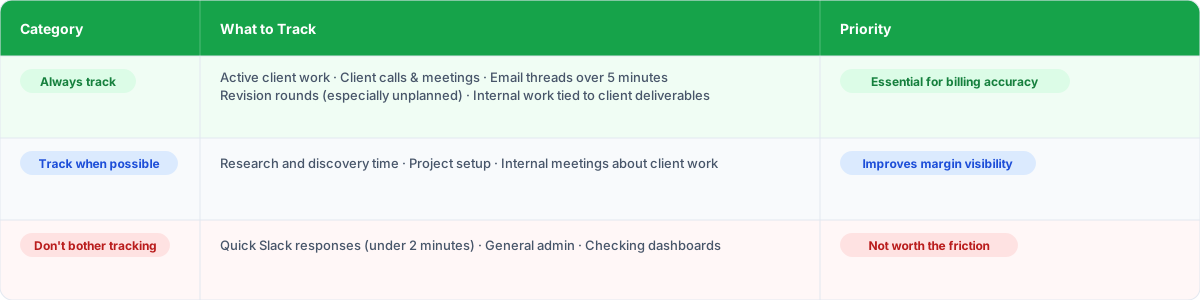
Always track:
- Active client work (design, development, writing, strategy)
- Client calls and meetings
- Email threads that run longer than five minutes
- Revision rounds, especially unplanned ones
- Internal work that's directly tied to a client deliverable
Track when possible:
- Research and discovery time
- Project setup and file organization
- Internal meetings about client work
Don't bother tracking:
- Quick Slack responses (under two minutes)
- General admin that isn't client-specific
- Checking your own analytics or dashboards
- Coffee breaks, obviously
The goal isn't a perfect accounting of every second. The goal is capturing enough billable work that your invoices reflect reality and your margins stay healthy.
Here's another way to think about it: McKinsey found that workers spend about 20% of their time just looking for information and tracking down what they need. If your time tracking system adds to that problem (because it's in a separate app, or it requires navigating away from your actual work), you'll stop using it. The system has to live where the work lives.
Why time tracking in a separate app always fails
Time tracking fails when it lives in a standalone tool, separate from where you do the work. The context switch from your work app to the time tracker is enough friction to kill the habit. This is where most time tracking solutions fall apart for agencies.
They're built as standalone tools. You do your work in one place, then switch to the time tracker to log what you did. That switch, small as it sounds, is enough friction to kill the habit. You tell yourself you'll log it later. Later becomes Friday. Friday becomes fiction.
The fix is integration. When time tracking is embedded directly into where you're already managing client requests, it stops feeling like extra work. You finish a task, you log the time, you move on. No context switching. No separate app.
This is why I like tools that tie time tracking to client requests and retainers instead of treating it as a separate function. As I covered in the piece on request management, when your requests live in one place, tying time tracking to them becomes natural instead of forced. Sagely, for example, bakes time tracking right into tickets with quick-log buttons, timers, and bulk entry. Time automatically deducts from retainers. You're just closing out a task, and the time gets captured as part of the normal workflow — no separate "time tracking" step required.
That distinction matters more than any feature comparison. The best time tracking tool is the one you'll actually use. And you'll use whichever one requires the least extra effort.
There are 72.9 million independent workers in the U.S. (according to MBO Partners), 5.6 million of them earning six figures or more. And most of them, especially at the small agency and freelancer level, still run on broken time tracking. People aren't lazy. The tools just ask you to change how you work instead of fitting into how you already work.
How to build the time tracking habit without making yourself miserable
Start with one client, make your time log visible, review weekly but log daily, and tie tracking to money by calculating your effective hourly rate per client. I'll be honest: even with the perfect system, time tracking requires a behavior change. And behavior change is hard. Here's what I've found works for small agency teams.
- Start with one client. Don't try to overhaul everything at once. Pick your biggest or most complex client and commit to tracking time on that account for two weeks. Build the muscle memory before expanding.
- Make it visible. Put your time log somewhere you can see it throughout the day. A pinned browser tab, a widget on your desktop, a physical notepad next to your keyboard. Out of sight, out of mind applies here more than anywhere.
- Review weekly, but log daily. The daily logging is the habit. The weekly review is where you catch patterns. Are you spending way more time on Client C than the retainer supports? Is email eating three hours a day on one account? You can't fix what you can't see.
- Tie it to money. This is the motivator that actually works. Calculate your effective hourly rate per client based on what you actually tracked versus what you billed. When you see you're earning $35/hour on a client you quoted at $125/hour, the motivation to track more carefully gets very real.
Remember: 19% of small business owners work 60-plus hours a week, and 89% work weekends. You're already putting in the time. The question is whether you're getting paid for it. Time tracking is how you make sure the answer is yes.
Stop reconstructing, start capturing
Time tracking will never be fun. I'm not going to pretend otherwise. But it doesn't have to be the Friday afternoon punishment that most agency owners have turned it into.
The shift is easy to say and hard to do: move from reconstruction to capture. Stop guessing what you did on Tuesday. Start logging it on Tuesday. You don't need to be perfect or obsessive about it. Just consistent enough that your invoices reflect reality and your margins stay healthy.
The agencies that figure this out bill more accurately and catch scope creep earlier. They have better conversations with clients about budget, and they prevent the disputes that can torpedo a relationship overnight. And they actually know whether they're profitable, which is information a shocking number of agency owners don't have.
Your time is literally what you sell. So track it like it matters.
Track time without thinking about it. See how Sagely works.
Frequently asked questions about agency time tracking
How much revenue do agencies lose from poor time tracking?
According to a study published in Harvard Business Review (AffinityLive), each professional services worker loses roughly $50,000 per year in revenue from insufficient time tracking. The U.S. economy loses 50 million hours and $7.4 billion per day across professional services. The work gets done, but nobody documents it properly.
Why is retroactive time tracking inaccurate?
When you log hours from memory days later, you're writing a narrative, not remembering. You round down tasks that felt easy, forget email chains entirely, and absorb scope creep because you don't recall it happened. People who track daily are significantly more accurate than those who do it weekly or less.
What is the best way to track time at a small agency?
Track time as close to real-time as possible. Use the "start and stop" method (note what you're doing and when), do three daily check-ins (late morning, after lunch, end of day), treat emails over five minutes as billable work, and aim for 80% capture rate rather than perfection.
What should agencies track time on?
Always track active client work, calls, meetings, email threads over five minutes, and revision rounds. Track research and project setup when possible. Skip quick Slack responses under two minutes and general admin. The goal is capturing enough billable work that your invoices reflect reality.
How does time tracking prevent billing disputes?
Every time entry logged in real time is a receipt. If a client questions your hours, you can point to timestamped entries tied to specific tasks and client approvals instead of a reconstructed spreadsheet. Consistent tracking catches scope creep early and provides the documentation trail that wins disputes.
Why does time tracking in a separate app fail?
The switch from your work tool to a separate time tracker creates enough friction to kill the habit. You tell yourself you'll log it later, later becomes Friday, and Friday becomes fiction. Time tracking must be embedded where the work happens so logging feels like closing a task, not extra overhead.