


Agency project management: systems that actually work
Agency project management is the system small agencies and solo operators use to track client requests, log billable time, manage communication, and prevent billing disputes across multiple retainer clients.
Unlike traditional project management built for product teams, agency project management revolves around ongoing client work, not fixed-scope projects with defined timelines.
Here's a confession: I've spent more money on agency project management tools than I'd ever admit out loud.
Asana. Monday. Trello. ClickUp. Each one was going to be the thing that finally fixed the chaos. Each one lasted about two weeks before becoming another tab I felt guilty about not opening.
The problem was never the tools. Not really. The problem was that nobody builds these things for agencies like mine. Three people. Eight clients. A hundred different requests flying in from every direction.
After years of running a small agency, I've come to a conclusion that sounds almost too simple: agency project management isn't about managing projects at all. It's about managing client work. And those are two very different things.
The actual deliverables (the designs, the campaigns, the code), that's rarely what kills you. What kills you is everything around the work. The tracking. The follow-ups. The "didn't we already discuss this?" conversations. The time you spend at 11pm on a Tuesday reconstructing what you worked on three weeks ago so you can justify an invoice.
And the numbers are brutal. According to PMI, 11.4% of every dollar invested is wasted due to poor project performance. For an agency running on razor-thin margins, that gap is your entire profit margin.
So let's talk about what actually works. Not the shiny tools. Not the complex frameworks built for 200-person teams. The systems that solo operators and small agencies can actually implement and stick with.
Why do most agency project management approaches fail?
Most agency project management approaches fail because the tools are built for product teams, not service businesses. Agencies don't run sprints or build features on predictable timelines. They field requests from multiple clients across multiple channels, all day, every day.
The "project" concept simply doesn't fit.
I can almost guarantee you've been through this cycle. You Google "best project management tool for agencies." You read a couple of listicles. You sign up for a free trial. You spend a weekend setting up boards and workflows and color-coded labels.
Then reality hits. The tool wants you to create "projects" for ongoing retainer work. It wants you to assign "sprints" to a team of one. It wants you to build workflows for processes you don't have. So you stop using it.
Here's why. Most project management tools were built for product teams at companies with 50 or more employees. They have sprint planning features you'll never use. Capacity planning dashboards for teams you don't have. Gantt charts that make your eight-client retainer work look absurd.
Agency work isn't building a product on a predictable timeline. It's fielding requests from multiple clients across multiple channels, all day, every day. The work changes constantly. Priorities shift on a phone call. The entire concept of a "project" doesn't even apply to most of what you do.
PMI's research shows that organizations that undervalue project management report 67% more project failures. But here's the thing: "undervaluing" project management doesn't mean you need to adopt enterprise-grade software. It means you need a system that actually fits your reality.
And your reality is messy. It's a mix of creative work, client communication, administrative tasks, and constant context-switching. No Kanban board will fix that if the underlying system doesn't match how agency work actually flows.
The real problem isn't the tool. It's the system underneath it. You don't need a better app. You need a better approach. One built around the reality that agency work is nothing like product development or corporate project management.
Spreadsheet alternatives for agencies (and when you've outgrown them)
Spreadsheets work for agencies with one or two clients, but they have a shelf life. According to research cited by MarketWatch, 88% of spreadsheets contain errors. When you have three or more active clients and requests come from multiple channels, the hidden cost of maintaining spreadsheets (the "spreadsheet tax") eats directly into your margins.
I'm going to be honest with you: spreadsheets work. At least, they work for a while.
When you're starting out with one or two clients, a well-organized Google Sheet can handle your task tracking, time logging, and even basic invoicing. It's free. You already know how to use it. There's no learning curve. And there's absolutely no shame in it.
But spreadsheets have a shelf life. And most agency owners don't realize they've outgrown them until the damage is already done.
According to research by Ray Panko, as cited by MarketWatch, 88% of spreadsheets contain errors. That's not an exaggeration. Nearly nine out of ten. And we're not talking about amateur hour here. Norway's sovereign wealth fund lost $92 million from an incorrect date entry in a spreadsheet.
JP Morgan's infamous "London Whale" trading loss was partly attributed to a spreadsheet error. If organizations with billions of dollars and entire teams of analysts can't keep their spreadsheets accurate, what makes you think yours is clean at the end of a 12-hour day?
Signs you've outgrown your spreadsheet:
- You spend more time updating the spreadsheet than doing actual client work
- You've caught yourself logging time three days after the fact (and guessing)
- A client disputed hours and you had no real proof beyond your own entries
- You've lost track of a request because it came in through Slack and never made it to the sheet
- Multiple versions of the spreadsheet exist and you're not sure which one is current
- You copy-paste client requests from email into the sheet and regularly miss things
But nobody talks about the hidden cost. I call it the "spreadsheet tax."It's the time you spend maintaining, updating, cross-referencing, and fixing your spreadsheets. Time that doesn't show up on any invoice because you can't bill a client for your own disorganization.
That spreadsheet tax compounds every week. And if you're running on the average agency net profit margin of about 10% (according to Parakeeto), those lost hours add up fast.
When DIY still makes sense: If you have one or two clients, stable scopes, and you're disciplined about updating your tracking daily, keep using the spreadsheet. Seriously. Don't fix what isn't broken.
When it becomes sabotage: If you have three or more active clients, if requests come from multiple channels, if you've ever lost billable time because you forgot to log it, it's time to move on. The spreadsheet tax is eating your margin, and you probably don't even realize how much.
How to track client requests without losing your mind
The best way to track client requests is a tiered approach: start with time blocking and discipline, move to centralized intake when you hit two or three clients, then adopt a dedicated request management platform when things start slipping through cracks. The key is one source of truth for every request, not five scattered inboxes.
This is the part of agency life that makes people question their career choices.
A client emails you a revision at 9am. Another one drops a comment in a Google Doc at 10:30. Your third client sends a Slack message about "one small thing" that turns out to be a complete redesign. Someone calls and says, "Hey, I mentioned something to you last Thursday, did you get a chance to look at it?" You have no memory of this conversation.
McKinsey found that workers spend 28% of their workweek managing email alone (about 2.6 hours a day). Nearly 20% more is spent looking for internal information or tracking down colleagues. That's almost half your week gone before you've done a single billable hour of work.
For agency operators, it's even worse. You're not just managing your own tasks. You're managing requests from multiple clients across multiple platforms, each with their own expectations about response time and priority.
Start at Level 1 and move up only when you need to.
Level 1: Time blocking (free, start here).
Before you buy anything, start with discipline. Block specific times in your Google Calendar for checking and responding to client communication. Morning for deep work. Post-lunch for admin and client messages. Late afternoon for follow-ups. Stop checking email every ten minutes. It's not productive. It's a nervous habit. Time blocking alone can reclaim hours of your week.
Level 2: Centralized intake (low cost or free).
Set up one place where client requests go. One email address. One intake form. When a client sends you a request through Slack or a phone call, you log it in the same central place. This sounds simple because it is. The hard part is being disciplined enough to actually do it every single time. No exceptions.
Level 3: A proper request management platform.
When you have three or more active clients, when requests are slipping through the cracks, when you're spending more time organizing work than doing it, that's when a tool like [Sagely](https://getsagely.co) starts making sense. Not because the tool magically fixes everything, but because it gives your system a permanent home. Client requests, communication, and time tracking all in one place instead of scattered across five apps.
How to know when to upgrade: If you're honest with yourself, you probably already know. If you've missed a client request in the last month, if you've ever said "sorry, that fell through the cracks," if you're tracking requests in your head instead of a system, you've outgrown your current setup.
If you've already set up a solid client onboarding process, you already know why a single source of truth matters for communication. Tracking client requests is that same idea applied to the day-to-day.
How to track billable hours at a small agency
Tracking billable hours at a small agency comes down to one rule: track as you go, not after the fact. Retroactive time entries are fiction. Integrate time tracking with your request management so logging happens alongside the work, not as a separate step you skip when you're busy.
According to Parakeeto, agencies lose 10-20% of gross margin annually to time that should have been billed but wasn't.
Let me tell you what time tracking actually looks like at most small agencies.
You get to the end of the week, open a spreadsheet, and try to remember what you did on Tuesday. Was it the landing page for Client A or the email campaign for Client B? Did that Slack call count as billable? You spent an hour on revisions, but were those approved revisions or scope creep you absorbed without saying anything?
This is how agencies bleed money. Quietly. Week after week.
AgencyAnalytics found that close to half of agencies say allocating and tracking billable time is their most common team management challenge. Parakeeto's data is even more alarming: agencies lose 10-20% of gross margin annually to non-billable time that should've been billed but wasn't. When the average agency net profit margin sits around 10%, losing another 10-20% to untracked work means you might actually be running at zero.
Why time tracking is so hard: It's not complicated. It's just annoying. It adds cognitive load to every task. You have to switch contexts from "doing the work" to "documenting the work." And when you're in flow state on a design or a campaign build, the last thing you want to do is stop and log a time entry.
But here's the connection most people miss: time tracking and billing disputes are directly linked. No time tracking means no proof. No proof means no pay. It really is that simple.
If you've ever wondered how to track billable hours for clients without wanting to throw your laptop out the window, here's what I've learned works:
- Track as you go, not after the fact: Retroactive time entries are fiction. If you're reconstructing the week from memory, you're guessing. Even rough real-time logging ("started Client A landing page at 2pm, wrapped around 4:30") is better than a perfect spreadsheet reconstructed from memory on Friday afternoon.
- Integrate it with your request management. Switching between your task tracker and a separate time tracker is a recipe for missed entries. When your time tracking lives alongside the actual work (the requests, the tasks, the deliverables) it becomes part of the workflow instead of an extra step you skip when you're busy.
- Accept imperfection. You will never track every minute. That's fine. The goal isn't perfection. The goal is having enough documented proof that when a client says "I don't believe you worked that many hours," you have something concrete to point at besides your word.
The agencies that track their time consistently (even imperfectly) are the ones that catch scope creep early, bill accurately, and avoid the disputes that can torpedo a client relationship overnight.
Billing dispute prevention: how to protect every invoice
Billing dispute prevention comes down to real-time documentation of every request, scope change, and approval. Combine that with weekly budget check-ins and written scope agreements in plain English. When you have timestamps, task logs, and approval emails, the "you're padding hours" argument falls apart.
Client is refusing to pay invoice because they don't believe the hours...We sent the invoice, and the client is refusing to pay the overage. They claim we are inflating hours. We logged everything manually in Excel, so I have no proof other than my word.
You'll find stories like this all over social media. Agency operators posting desperate requests for advice after getting burned on invoices they genuinely earned. It happens on a weekly basis. And it doesn't just sting emotionally. It can kill your business.
According to SmallBizGenius, 82% of businesses that fail do so because of cash flow problems. And only 40% of small businesses are profitable. Another 30% lose money, and 30% break even. When you're already operating on those kinds of margins, a single unpaid invoice can spiral into a crisis.
I've been there. Early in my agency days, a client disputed an invoice for about 40 hours of revision work I'd done over three weeks. Every single hour was legitimate.
But all I had was a spreadsheet I'd filled in from memory the Friday before invoicing. When the client pushed back, I couldn't point to timestamps, task logs, or approval emails. All I had was my word against their skepticism.
I ended up eating those hours just to save the relationship. I get it, it feels terrible. But that's a fight you lose every time, and it taught me that documentation isn't busywork. It's the only thing standing between you and getting stiffed.
The root causes are always the same:
- Vague scope of work with no clear boundaries on what's included
- No paper trail for change requests and approvals
- Time entries logged retroactively, days or weeks after the work was done
- No regular check-ins where hours and budget are reviewed with the client
- Scope creep absorbed silently until it becomes unsustainable
What actually prevents this:
Document everything as it happens. Not at the end of the project. Not when you're generating the invoice. When the request comes in, when the scope changes, when the client approves additional work. Real-time documentation is your insurance policy.
Get scope agreements in writing. And not buried in a 40-page contract nobody reads. Put it in plain English. "Here's what's included. Here's what's not. Here's what happens when you need something outside the scope." Both sides should understand this before any work begins.
Use the "approval email" technique. The second you realize you're going over the estimate, send the client an email. Tell them why. Give them the updated hours or set a hard cap. Make it clear: approve the extra time, or the work pauses. If you've got that approval email plus your task logs, the "you're padding your hours" argument falls apart quickly.
Run regular check-ins on hours and budget. Don't wait until the invoice to surprise a client with overages. Share where you are against the budget weekly or biweekly. This keeps the client informed and forces you to actually track your time.
Remember the financial math of running an agency: that 10% net margin means every unpaid invoice is a direct hit to money you cannot afford to lose. Prevention is always cheaper than collection.
How to build agency workflows: systems before tools
Agency workflow management starts with building a repeatable system, not buying software. A tool without a system is just software you're paying to not use. Define your three layers first: intake (how requests enter), execution (how work gets done), and reporting (how you show results).
Then find a tool that supports them. Here's a pattern I see constantly. Agency operator is overwhelmed. They Google "best agency project management tool." They buy it. They use it enthusiastically for two weeks. Then it becomes another abandoned login gathering digital dust. They feel guilty about it for a month. Then they buy another one.
Sound familiar?
Zylo's 2025 SaaS report puts it plainly: the average company now manages 305 SaaS applications. And 46% of those licenses go to waste. Productiv found that only 30% of employees feel they have the correct tools for their work. Hundreds of tools, and most people still don't feel like they have the right ones.
The problem isn't the tool. It's the missing system underneath it.
A tool without a system is just software you're paying to not use. But a system without a tool can still work. It might be clunky. It might be manual. But it works because there's a repeatable process behind it.
Start with the three layers of agency workflow:
- Intake. How do client requests enter your world? Is it consistent? Is there one channel or five? If you don't control the intake, you don't control anything that follows.
- Execution. How do you do the work? How are tasks prioritized? How do you handle competing deadlines from different clients? This doesn't need to be complicated, but it does need to be intentional.
- Reporting. How do you show clients what you've done? How do you show yourself where your time went? Without reporting, you're flying blind on utilization, profitability, and client satisfaction.
Build the system for each layer first. Use a calendar, a notes app, and yes, even a spreadsheet if you have to. Then, once the system is actually working and you can describe it to someone else, find a tool that supports it. Not the other way around.
This is the same "systems over tools" philosophy from our work on client relationship management. The principle carries across everything you do as an agency operator. Systems first. Tools second. Always.
What tools do small agencies actually need?
Small agencies need four things: client request management with built-in communication, time tracking integrated with task management, a proposal and contract tool, and accounting software. Total monthly cost should stay under $150-200. Consolidation matters more than features: fewer tools means fewer places for work to fall through the cracks.
Zylo found that 52% of organizations overspent their SaaS budgets last year. And 61% were forced to cut projects because of unplanned SaaS cost increases.
For a small agency already running on a 10% net margin, an out-of-control tool stack can be the difference between profitability and payroll anxiety.
The rule is simple: fewer tools, better systems.
If you're searching for agency project management software, creative agency project management software, or marketing agency project management software, you'll find hundreds of listicles comparing features. The same goes for advertising agency project management software, digital agency project management software, and every other variation.
They're all solving the same core problem. Whether you're a design studio, a dev shop, or a media agency, what matters isn't the label, it's whether the software organizes work around your clients or around abstract projects. Most don't. That's why most agencies end up paying for project management software that helps agencies in theory but creates more work in practice.
Most agency owners accumulate tools through panic. A billing scare leads to a time tracker subscription. A missed deliverable leads to a project management tool.
A client complaint leads to a communication platform. Before you know it, you're managing a dozen logins that don't talk to each other and spending as much time maintaining your stack as doing client work.
What you actually need:
- Client request management: One place for everything client-facing. Requests, communication, files, approvals. This is where Sagely fits. It's built specifically for solo and small agency teams, not enterprise IT departments.
- Time tracking: This should be integrated with your request management, not a separate app you have to switch to. Switching between tools to log time is exactly why people stop logging time.
- Proposals and contracts: PandaDoc, Proposify, or something similar. You need to send professional proposals and get contracts signed. Pick one and stick with it.
- Accounting: QuickBooks, Wave, or FreshBooks. You need to get paid and track expenses. This is non-negotiable.
What NOT to pay for:
- A separate communication tool when email already works for your clients
- A fancy reporting dashboard when a simple monthly document does the same job
- Any tool that duplicates functionality you already have in another tool
- Anything built for teams of 50 or more when you're a team of 3
Here's how I think about it: consolidation matters more than features for small teams. Fewer subscriptions saves money, obviously. But fewer tools also means fewer places for things to fall through the cracks.
Your total monthly tool cost for running a legitimate agency operation shouldn't exceed $150-200. If you're spending significantly more than that and you're under ten people, you need to audit what you're paying for and what you're actually using.
SmallBizGenius reports 19% of small business owners already work over 60 hours a week, and 89% work weekends. You don't need to spend those hours managing tools that don't serve you.
Why agencies should stop managing projects and start managing client work
After years of running an agency and building tools for other agency operators, I've landed on this: the entire concept of "project management" is wrong for most agencies.
Projects have a start date, an end date, and a defined scope. Agency work has none of these things. You have ongoing retainers. You have clients who send three requests on Monday and nothing for two weeks.
You have scope that shifts based on a single phone call. Calling this "project management" is like calling a jazz improvisation a symphony. Different thing entirely.
What agencies actually need isn't project management. It's client work management.
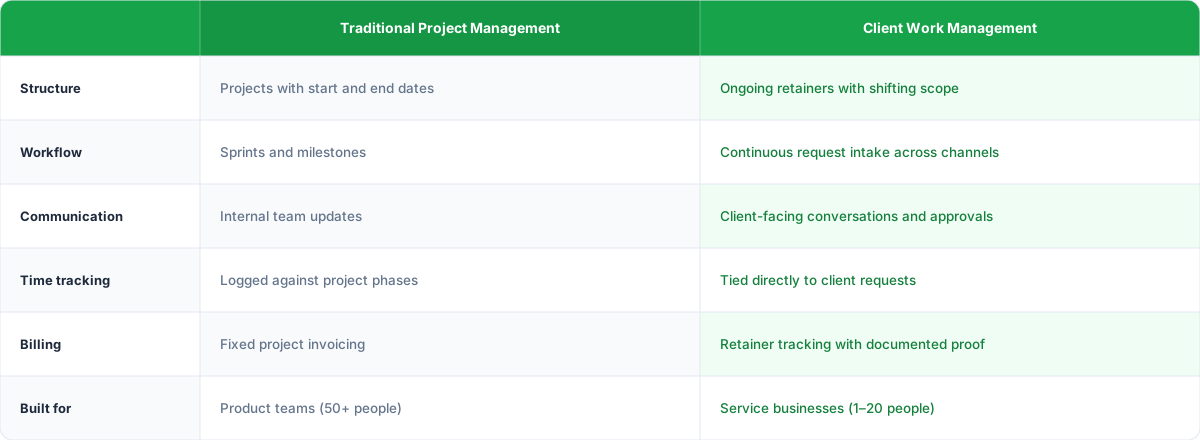
That means:
- A system for client request intake that doesn't rely on your memory
- Communication tools built for client relationships, not internal product teams
- Time tracking that ties directly to the work being requested, not a separate logging exercise
- Billing support that gives you documented proof, not just your word
The tools built for enterprise teams don't understand this. They're designed for internal teams building products on predictable timelines. That's not you. That's not even close to you.
That's the same thinking behind everything we discussed about client relationship management: the relationship is the business. The work is just how it gets delivered. Managing client work means managing the relationship, the communication, the expectations, and the proof that it all happened. The admin, the tracking, the constant messages. That's what actually determines whether your agency grows or just treads water.
Stop looking for the perfect agency project management tool. Start building systems around how your clients actually work with you. The tool should fit your workflow, not the other way around.
If you're tired of forcing your three-person agency into software built for companies with dedicated project managers and sprint planners, take a look at Sagely It's built for the way small agencies actually work. No enterprise bloat. No features you'll never touch. Just client request management, communication, and time tracking in one place.
Frequently asked questions about agency project management
What is agency project management?
Agency project management is the system agencies use to track client requests, log billable time, manage communication across channels, and prevent billing disputes. Unlike traditional project management for product teams, it revolves around ongoing retainer work with multiple clients, not fixed-scope projects with defined end dates.
Why don't traditional project management tools work for small agencies?
Traditional PM tools are built for product teams with sprints, milestones, and 50+ person teams. Small agencies handle ongoing retainer work from multiple clients across multiple channels. The "project" concept doesn't fit when scope shifts on a phone call and you're a team of three.
When should an agency stop using spreadsheets for project tracking?
You've outgrown your spreadsheet when you have three or more active clients, requests come from multiple channels, you're logging time days after the fact, or clients have disputed hours you couldn't prove. According to research cited by MarketWatch, 88% of spreadsheets contain errors.
How can agencies prevent billing disputes with clients?
Prevent billing disputes by documenting everything in real time, getting scope agreements in plain English, and running weekly budget check-ins. The moment you realize you're going over estimate, email the client with updated hours and get written sign-off before continuing work.
What's the ideal tool stack for a small agency?
A small agency needs four categories: client request management with built-in communication, time tracking integrated with your task system, a proposal and contract tool, and accounting software. Your total monthly cost should stay under $150-200 for teams under ten people.
How much revenue do agencies lose to poor project management?
According to PMI, 11.4% of every dollar invested is wasted due to poor project performance. Parakeeto's data shows agencies lose 10-20% of gross margin annually to non-billable time that should have been billed. On a typical 10% net margin, that can mean effectively running at zero profit.
What's the difference between project management and client work management?
Project management assumes defined scope, start and end dates, and predictable timelines. Client work management handles ongoing retainers, shifting scope, multi-channel requests, and continuous communication. Most agencies need client work management, not traditional project management.
Should I build a system before buying a project management tool?
Yes. A tool without a system is software you're paying to not use. Define how requests enter your world (intake), how work gets prioritized (execution), and how you report results (reporting). Once those processes work manually, find a tool that supports them.