


You don't need another tool. You need the right one.
I've watched agencies adopt three or four different portal solutions in two years because the first one looked good in a demo and fell apart in practice. Per-seat pricing that ballooned. Portals so clunky that clients refused to log in. "All-in-one" platforms that did ten things at a 6/10 level and nothing at a 9.
Here's an honest look at six agency client portal software options: what each one does well, where it falls short, and which type of agency it fits. No affiliate links. No "they're all great in their own way." Real opinions.
Client portal software for agencies is a tool that gives clients a secure, branded space to submit work requests, check project status, access files, and track retainer usage. The best ones reduce status-update emails and keep every client interaction in one searchable place.
If you want the broader picture first, start with our complete guide to client portals for agencies.
How to evaluate client portal software for agencies
When evaluating agency portal software, prioritize client login experience, security, branding, integrations, retainer tracking, and pricing model. These six factors determine whether your team and clients actually use the tool.
Before we get into specific products, here's the evaluation checklist I use. These are the things that actually matter when you're choosing client portal software for agencies, ranked by how much they'll affect your day-to-day.
Client experience and login friction. If clients need to create an account and remember a password, they won't use it. Look for OTP (one-time password) or passwordless login. Code, click, done.
Security and data isolation. Client A should never see Client B's data. You want encryption in transit and at rest, audit logs, and (depending on your clients) SOC 2 or HIPAA compliance.
Branding. Your portal should look like your agency. Custom domain, your logo, your colors. Not some generic SaaS interface with another company's branding in the corner.
Integrations. If it doesn't connect to Slack, email, and your PM tool, you've just created another silo.
Retainer tracking. Non-negotiable for retainer agencies. Clients need to see how their hours are being spent. This is where billing disputes start.
Pricing model. Per-seat pricing will wreck you. A team of 8 can turn a "$10/month" tool into $300/month fast. Look for flat pricing or capped tiers.
Quick pricing comparison
Here's what you're looking at across all six tools, starting price and pricing model:
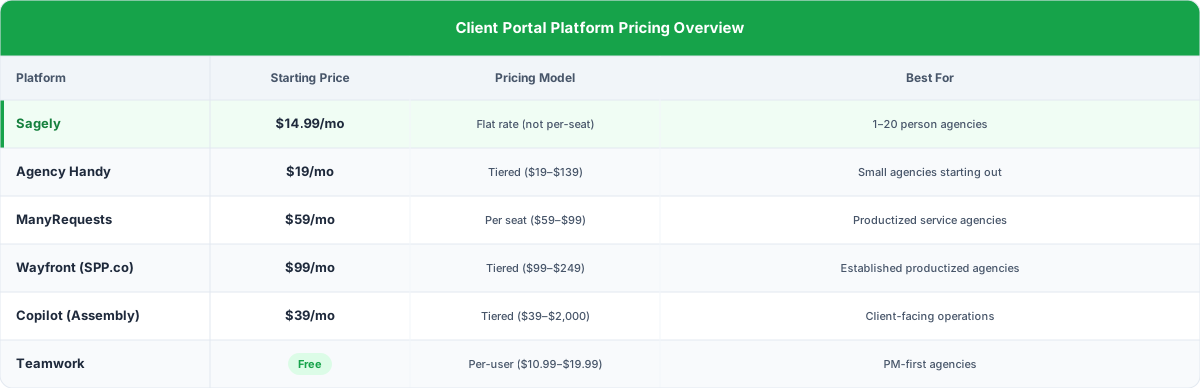
The gap between cheapest and most expensive is massive. But price means nothing if the tool doesn't fit your workflow. Let's look at each one.
The 6 best agency client portal software options
1. Sagely
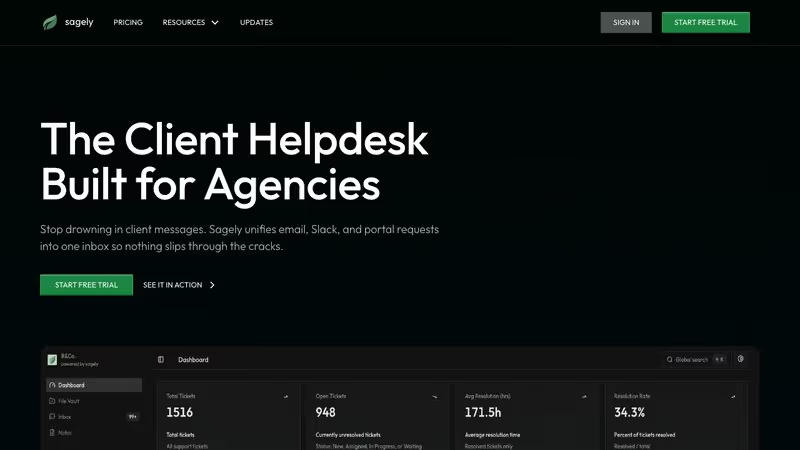
Best for: Retainer-based agencies (1-20 people) that live in Slack.
Pricing: Solo $14.99/mo, Freelancer $29/mo, Agency $79/mo. All flat pricing, not per-agent. 14-day free trial, 100GB storage included.
Sagely was built specifically for agencies running retainers that need a portal their clients will actually use. The OTP (one-time password) login is the standout. A client clicks a link, gets a code, and they're in. No account creation. No password resets. No friction.
The omni-channel inbox pulls Slack, email, and portal messages into a single thread per client. Your clients keep using whatever channel they prefer (they will anyway), and your team sees everything in one place.
Retainer tracking is native. Time tracking ties directly to tickets, so billable hours connect to actual work instead of a spreadsheet nobody updates. When the client sees "32 of 40 hours used" with a breakdown, the invoice conversation becomes a non-event.
Where it falls short. No invoicing yet. No white-label option yet. No AI features. For most small to mid-size retainer agencies, those aren't dealbreakers. But if invoicing and white-labeling are at the top of your list, know that going in.
Bottom line: Best value on this list for retainer agencies. Flat pricing means your costs don't balloon when you hire. OTP login solves the biggest problem most agencies face: getting clients to actually log in.
2. Agency Handy
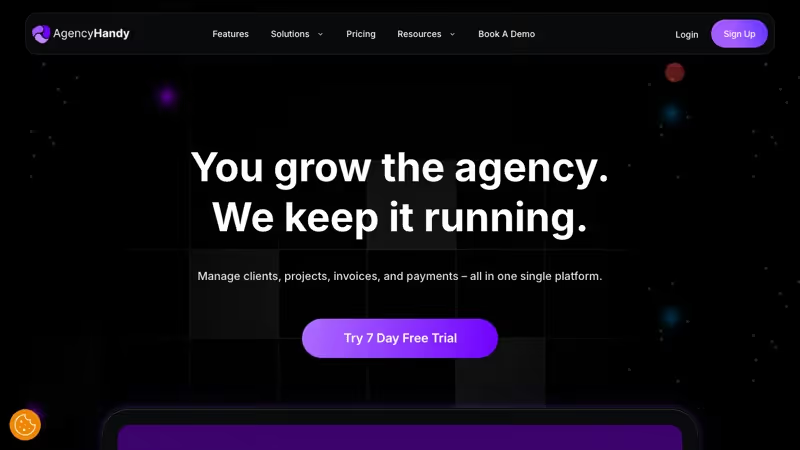
Best for: Agencies selling productized services who want everything in one platform.
Pricing: Freelancer $29/mo ($19 with coupon), Team Starter $99/mo ($69), Business Pro $199/mo ($139). Has run aggressive lifetime deals.
Agency Handy is the "replace six tools with one" play. It bundles a client portal, CRM, productized service storefronts, invoicing, order management, and file feedback into a single platform. Over 7,000 agencies use it, and the pitch is compelling: stop paying for five separate subscriptions when one tool handles everything.
The productized services angle is what sets it apart. If you sell fixed-scope packages ("$2,500/mo for 8 blog posts" or "$500 for a landing page"), clients can browse and purchase directly from service catalogs. Invoicing is built in. File feedback tools let clients annotate deliverables, which speeds up reviews.
Where it falls short. Slack integration only comes with the Team plan and above. The coupon pricing is appealing, but regular prices ($99-$199/mo for teams) tell a different story. And the all-in-one approach means nothing is exceptional. The CRM, portal, and invoicing each work, but none match a dedicated tool.
Bottom line: Good choice if you sell productized services and want to consolidate your stack. Just know that "replaces six tools" usually means "does six things okay" rather than "does one thing exceptionally well."
3. Wayfront (formerly SPP.co)
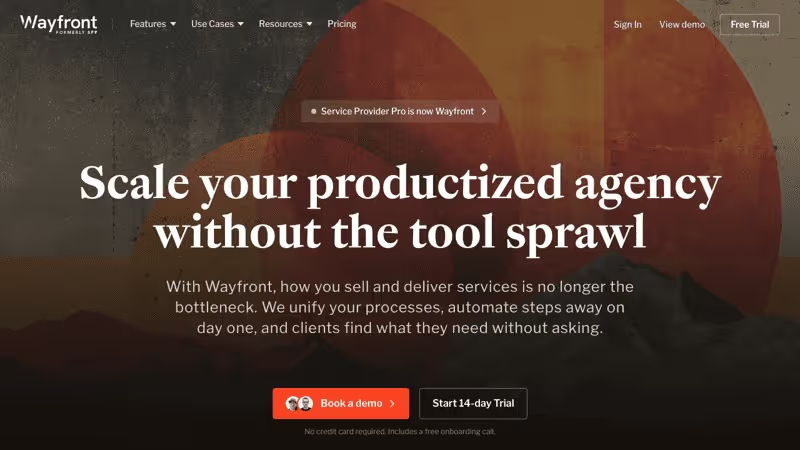
Best for: Productized SEO and content agencies with order-based workflows.
Pricing: Base $99/mo (5 seats), Pro $249/mo (10 seats), Plus custom pricing. Founded in 2014. Over $500M in services sold through the platform.
Wayfront has been around since 2014, and it shows in the platform's maturity. This is the tool for agencies that run on orders, not retainers. If clients come to you, place an order for a defined service, pay at checkout, and wait for delivery, Wayfront was built specifically for that workflow.
The order forms with integrated checkout are well done. Clients place orders, pay, and track delivery from one branded portal. White-label reseller tools and referral programs add revenue options most portals don't touch. Wayfront AI automates parts of fulfillment. And $500M+ sold through the platform means this infrastructure is battle-tested.
Where it falls short. No time tracking. No native retainer management. If you run monthly retainers with flexible hours, Wayfront doesn't support that model. At $99/mo base (5 seats), it's also the most expensive entry point on this list.
Bottom line: If you've productized your services and run on orders with checkouts, Wayfront is the most mature, battle-tested platform for that model. If you run retainers or do custom scope work, it's not the right fit.
4. ManyRequests
Best for: Design subscription and creative agencies running unlimited design models.
Pricing: Core $59/mo + $20/seat, Pro $99/mo + $30/seat. Over 1,800 agencies on the platform. 84% choose the Pro plan.
ManyRequests was built for creative agencies running subscription models. "Unlimited design requests for $X/month." The request queue, design proofing, and priority management are all tailored for that workflow.
The white-label portal is solid. Clients submit requests, see queue position, and review deliverables with built-in proofing for design and video. Hours rollover for retainers (unused hours carry over), and Zapier connects it to your wider stack.
Where it falls short. Per-seat pricing is the elephant in the room. $59/mo plus five team members at $20 each is $159/mo. A team of 10 on Pro: $399/mo. Slack is Pro-only. And 84% choosing Pro tells you the Core plan is probably missing things you'll need.
Bottom line: Purpose-built for design subscription and unlimited creative services. But model out your actual per-seat costs before committing. What looks like $59/mo can easily become $300+.
5. Teamwork
Best for: Larger agencies (20+) that want project management first, with client access bolted on.
Pricing: Free tier (5 users), Deliver $10.99/user/mo, Grow $19.99/user/mo, Scale custom. Used by Disney, Spotify, among others.
Teamwork is a project management tool that also offers client access. Not the other way around. That distinction matters.
If you need deep PM (Gantt charts, resource planning, budget tracking, workload management), Teamwork delivers at a level none of the others here can match. Disney and Spotify use it for a reason. For a 30-person agency managing dozens of projects, this is the right infrastructure.
Where it falls short. Teamwork doesn't have a dedicated client portal. Clients log into the same tool your team uses with limited permissions. No branded login page, no OTP, no self-serve dashboard. Retainer management is in beta. No helpdesk. Per-user pricing means a team of 15 on Deliver is $165/mo, and that still doesn't include portal features.
Bottom line: Choose Teamwork if you need project management first and can live without a real client portal. Don't choose it if the portal is actually the priority. Great PM tool. Not a great portal.
6. Assembly (formerly Copilot)
Best for: Professional services firms with compliance requirements (healthcare, finance, legal clients).
Pricing: Starter $39/mo, Professional $149/mo, Advanced $399/mo, Enterprise $2,000/mo.
Assembly is the compliance play. SOC 2 and HIPAA, contracts and eSignatures, an AI assistant for client operations. If you serve clients in healthcare, finance, or legal, compliance is the baseline for even getting the contract.
The portal is clean: contracts, file sharing, messaging, billing in one branded experience. The AI handles intake forms, document routing, and communications.
Where it falls short. Assembly isn't agency-specific. It serves law firms, accounting practices, and consulting firms too. That breadth means it doesn't go deep on retainer tracking, creative proofing, or request queues. And the pricing escalates fast: most agencies need the $149/mo Professional plan, with Advanced at $399/mo and Enterprise at $2,000/mo.
Bottom line: If compliance is a hard requirement because your clients are in healthcare, finance, or legal, Assembly is the only option on this list built for that. If compliance isn't a requirement, you're paying a premium for features you'll never use.
Feature comparison matrix
Here's how all six stack up across the features that matter most for agencies:
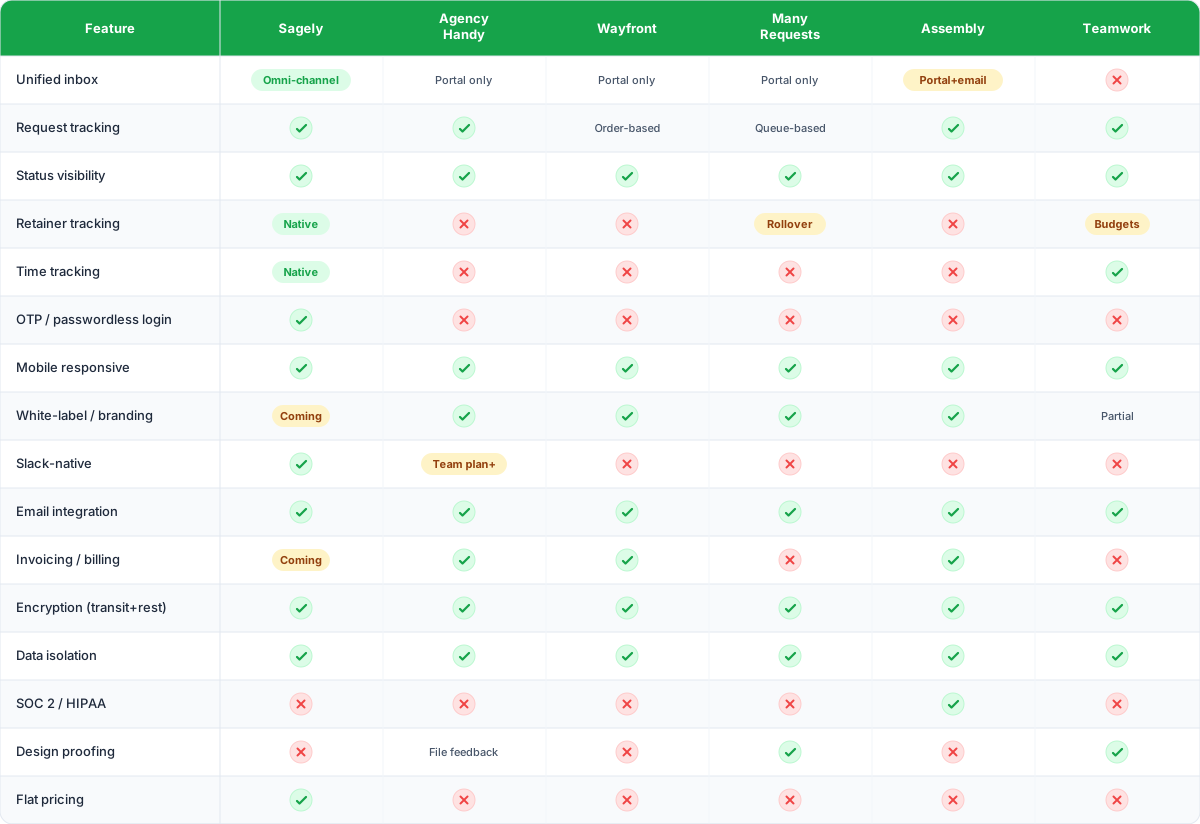
No single tool checks every box. That's not a cop-out. It's the reality of a market where agencies have wildly different workflows. You're choosing which tradeoffs you can live with.
Which tool for which agency type
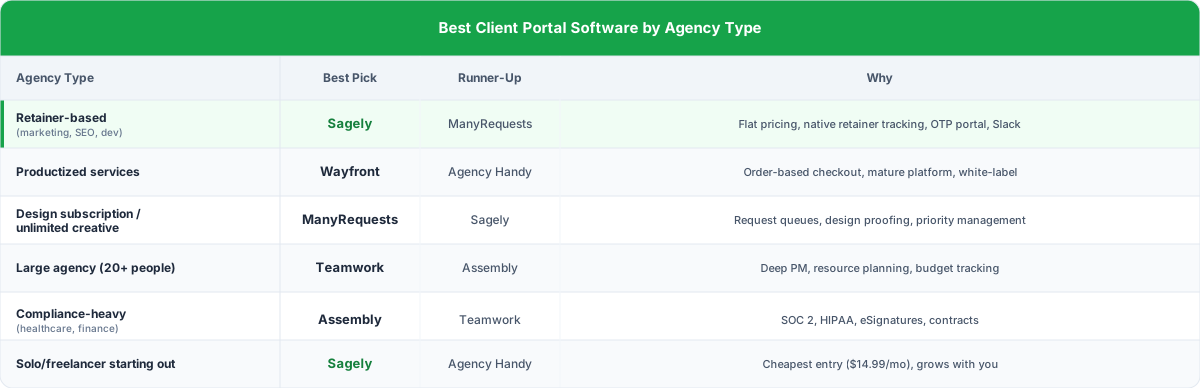
Here's the verdict based on what type of agency you run:
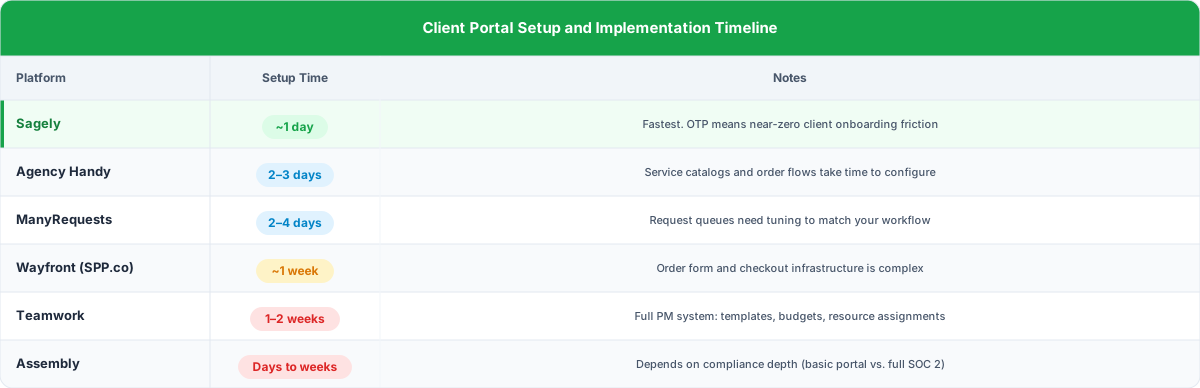
Setup and implementation: what to expect
Setup time ranges from one day (Sagely) to two weeks (Teamwork), and the longer it takes to configure, the more likely it never actually launches.
Don't overlook this. The best portal is worthless if it takes three weeks to configure.
FAQ: Choosing client portal software for agencies
What is agency client portal software?
Agency client portal software gives your clients a secure, branded space to submit requests, check project status, access files, and communicate with your team. It centralizes interactions that would otherwise scatter across email, Slack, and shared folders, reducing status-update emails and keeping every client interaction in one searchable system.
How much does client portal software cost for agencies?
Entry-level starts at $15-$39/month. Mid-tier: $59-$149/month. Enterprise/compliance: $399-$2,000/month. The pricing model matters more than the sticker price. Per-seat pricing gets expensive fast as you grow. Flat-rate or tiered pricing protects you from cost creep.
Do clients actually use portals, or will they keep emailing me?
They'll use it if it's easy. The biggest factor in adoption is login friction. OTP (passwordless) login drives significantly higher adoption than requiring passwords. If clients can check status and pull files themselves, they'll prefer the portal over waiting for your reply. You'll still get some emails, but the volume drops dramatically.
Should I pick an all-in-one platform or a specialized portal?
Depends on how many tools you want to manage. All-in-ones consolidate but rarely excel at any single function. Specialized portals go deeper on what matters most. Pick the tool that nails your most important workflow, and integrate for the rest.
What's the most important feature in a client portal?
Low-friction login and retainer/usage transparency. Everything else is secondary. If clients can't get in easily, they won't use it. If they can't see what they're paying for, you'll deal with disputes and churn. OTP (passwordless) login solves the friction problem, and real-time retainer dashboards solve the transparency problem.
The bottom line
There's no single best agency client portal. There's the best one for how your agency works.
Retainers + Slack? Sagely. Productized services? Wayfront or Agency Handy. Compliance? Assembly. PM-first with client access? Teamwork.
Pick based on your workflow, not the feature checklist. And whatever you choose, make sure your clients can actually get in without calling you for help. That's the bar.
For the full picture, see our complete guide to client portals for agencies. Comparing PM tools? Check out best marketing agency project management software and agency management software.