


Client Portals for Agencies: The Complete System (2026 Guide)
Last updated: March 2026
Most agencies don't have a client portal problem. They have a "clients can't find anything and keep asking me the same questions" problem.
And that problem is quietly eating your agency alive.
I'm not being dramatic. I've run agencies where half my week was spent answering status update emails, digging up files clients already had, and re-explaining scope that was documented somewhere in a Google Doc nobody could find. Fielding status questions all day isn't client service — it's a support desk you didn't sign up to run.
A client portal for agencies is a secure, branded hub where clients submit requests, track project status, access files, and message your team in one place. It replaces the scattered mess of email, Slack, and shared folders that quietly eats your week.
Client portals for marketing agencies aren't a "nice to have" feature you bolt on once you hit some magic revenue number. They're the system that determines whether your agency scales past a dozen clients or stays stuck answering the same Slack messages until you burn out.
Here's what this guide covers: what a client portal actually needs to do, the real problems it solves (and the ones it doesn't), how to evaluate software without getting sold a bloated enterprise tool, and how to actually get your clients to use the thing once you set it up.
Why agencies need client portals in 2026
A client portal is a secure, branded space where your clients can submit requests, check project status, access files, and communicate with your team, all without sending you another email or Slack message asking "what's the status on that thing?"
Here's the reality: client expectations have fundamentally changed. Your clients use Stripe dashboards. They track their Amazon orders in real time. They check their bank balance from their phone at 2am. And then they hire your agency and get... a shared Google Drive folder and a weekly email update?
That gap between what clients experience everywhere else and what most agencies deliver is getting wider every year.
The numbers back this up. 91% of customers would use a self-service portal if it met their needs (Zendesk). And 70% of customers expect a company's website to include a self-service application (SuperOffice). This isn't a tech trend. It's a baseline expectation.
When I first started offering clients a portal instead of email threads, I expected pushback. "Just email me the updates," I figured they'd say. The opposite happened. Clients loved it. Not because portals are exciting, but because they could check status at 10pm without feeling like they were bothering me. They could pull the file they needed without waiting for me to dig through Dropbox. They felt in control.
And here's the business case that matters: increasing customer retention by just 5% increases profits by 25-95% (Harvard Business Review, Bain & Company). Acquiring a new client costs 5-25x more than retaining an existing one (HBR). A portal won't single-handedly fix retention, but it removes the friction that makes clients feel neglected. And neglect is the number one reason clients leave agencies, not bad work.
The scaling wall
Every agency hits a wall somewhere around 8-12 active clients. Before that, you can muscle through with email, Slack, and shared folders. You know every project, every client's preferences, every deadline.
Then client number 13 shows up and everything cracks.
Files get lost. Status updates slip. You forget to respond to that one request that came in through email while you were deep in a Slack thread for a different client. Your team spends 5-10 hours per week just context-switching between tools, trying to figure out what's going on across accounts.
A portal doesn't just help with organization. It creates a single system of record for every client interaction. Requests, files, conversations, scope, all of it lives in one place. That's the difference between an agency that can handle 20 clients and one that falls apart at 15.
What a modern agency client portal actually includes
An agency-grade client portal needs request management, real-time status tracking, file sharing, retainer visibility, secure messaging, and a branded white-label experience.
Not every portal is built for agencies. Most aren't, actually. A lot of client portal software was designed for IT helpdesks or enterprise customer support and then marketed to agencies with a fresh coat of paint.
Here's what an agency client portal actually needs to do:
Request submission and tracking. Clients need a way to submit requests, changes, and feedback that doesn't involve email. And you need those requests to land in a structured format you can actually manage. Not another free-text email with "a few small changes" that turns into 14 hours of work. Good portals let you create request forms that capture the right details upfront, so you stop playing 20 questions before you can start working.
For a deeper look at how request workflows tie into portal systems, check out our guide on request management for agencies.
Status tracking clients can see themselves. This one is huge. 40% of consumers prefer self-service over human contact (SuperOffice). Your clients don't want to email you for a status update. They want to log in and see where their project stands. If your portal doesn't give clients visibility into what's in progress, what's done, and what's coming up, you haven't solved the problem. You've just moved it to a different URL.
File sharing and delivery. No more "can you resend that file?" Finished deliverables, brand assets, project documents, all of it should live in the portal where clients can access it on their own schedule. We break down how file sharing, retainer tracking, and requests connect in our deep-dive on modern portal operations.
Retainer usage and transparency. If you run retainer accounts (and most agencies do), clients need to see how their hours are being used. This is where 90% of billing disputes start: the client has no visibility into what you've been doing, so when the invoice shows up, they push back. A portal with retainer tracking eliminates that friction. We'll dig into this more below.
Secure messaging. Conversations about client work shouldn't be scattered across Slack, email, text messages, and the occasional WhatsApp thread. A portal consolidates communication into one auditable channel.
Branded experience. Your portal should look like your agency, not like a generic SaaS tool. White-labeling matters because it reinforces your professionalism and makes the portal feel like part of your service, not some third-party tool you bolted on. If branding matters to you (it should), read our guide on building a branded client portal.
The real problems client portals solve
Client portals eliminate the biggest operational time sinks: status update emails, untracked scope creep, lost files, billing disputes, and communication scattered across five different platforms.
Let's get specific about what actually changes when you put a portal in place. Because "better client experience" is vague. Here's what's not vague:
The "what's the status?" problem
If you run an agency, you already know this one. A client emails you asking about a deliverable. You check Slack. Then Asana. Then your email. Then you ask your designer. Twenty minutes later, you respond with a two-sentence update.
Multiply that by 10 clients, three times a week each. That's hours of your week gone. Not on client work. On answering questions about client work.
A portal with real-time status tracking kills this entirely. Clients see where things stand. They stop asking. You stop context-switching.
Scope creep and invisible work
Here's the thing about scope creep: it doesn't happen in one big moment. It happens in tiny increments. A Slack message here. A "quick thing" email there. None of it gets tracked. None of it counts against the retainer. And by the end of the month, you've done 15 extra hours of work that nobody's paying for.
When requests come through a portal, they're logged. They're timestamped. They're tied to a client and a project. A single source of truth isn't just organization — it's protection. When a client says "we didn't ask for that much work," you have the receipts. With manual tracking, 20-30% of billable time goes untracked. A portal with built-in time tracking closes that gap.
File chaos
Every agency has a graveyard of shared Google Drive folders, Dropbox links, and email attachments that nobody can find six months later. Clients ask for a file you delivered in Q2. You spend 20 minutes hunting for it. Or worse, you send the wrong version.
A portal centralizes file delivery. Every deliverable, every version, every asset, all tied to the right client and project. It's boring. It's also the kind of boring that saves you real money.
Retainer transparency
This one is personal for me. I've lost clients because they didn't understand how their retainer hours were being spent. Not because we did bad work. Because they had zero visibility into the work itself.
When a client sees "40 hours used out of 40" with a breakdown of exactly what those hours went to, the invoice conversation becomes a non-event. When they see nothing and just get a bill, that's when the "I don't think we're getting our money's worth" conversation starts.
Retainer tracking in a portal isn't a feature. It's a retention tool. If you're running retainers without giving clients visibility, you're setting yourself up for the same disputes I dealt with early on.
Communication sprawl
How many channels are you using to talk to clients right now? Email, Slack, maybe a project management tool with its own comment threads. Some clients text you directly. One client insists on WhatsApp.
It's a mess. And it's not just inefficient. It's risky. Important requests get buried in channels you forgot to check. Approval conversations live in DMs with no audit trail. If a client dispute ever escalates, good luck piecing together what was agreed to across five platforms.
A portal gives you one place for client communication. Some platforms (including Sagely) offer omni-channel inboxes that pull in Slack and email into a unified thread, so clients can keep using whatever channel they prefer while you see everything in one view.
How to evaluate client portal software
Evaluate portal software by client experience first, then security, branding, integrations, pricing model, and setup effort. The tool that's easiest for clients to log into wins.
The average company manages 305 SaaS applications (Zylo, 2026). And 53% of those licenses are underutilized (BetterCloud). So before you add another tool, let's make sure you're picking the right one and that it actually sticks.
Here's what to evaluate, in order of what actually matters:
1. Client experience
This comes first because it determines adoption. If the portal is confusing, your clients won't use it. And a portal nobody uses is just another line item on your SaaS bill.
Look for: passwordless login (OTP codes beat forcing clients to remember yet another password), clean interface, mobile-friendly, minimal learning curve. Your clients aren't power users. They're busy people who want to check something and get out.
2. Security
Client data is sensitive. NDAs, financial information, strategic documents, login credentials. If your portal doesn't handle this properly, you're creating liability.
Must-haves: encryption in transit and at rest, per-client data isolation (client A should never see client B's files), OTP or passwordless authentication, and audit logs. We cover this in much more depth in our client portal security guide.
3. Branding and white-label
Your portal should look like your agency. Custom domain, your logo, your colors. When a client logs in, they should feel like they're accessing your system, not some random SaaS tool.
This isn't vanity. It's professionalism. It signals that you've invested in the client experience, and that signal matters for client retention. There's a reason clients are demanding self-serve portals, and branding is part of how you meet that expectation.
4. Integrations
A portal that doesn't connect to your existing workflow just creates another silo. At minimum, it should integrate with your email, Slack (or Teams), and whatever project management tool you use. Bonus points for time tracking and invoicing integrations.
5. Pricing model
This is where a lot of portal software gets agencies. Per-seat pricing sounds reasonable until you have 8 team members across 15 client accounts. Suddenly your "affordable" portal costs $300/month.
Here's a rough comparison of what's out there:
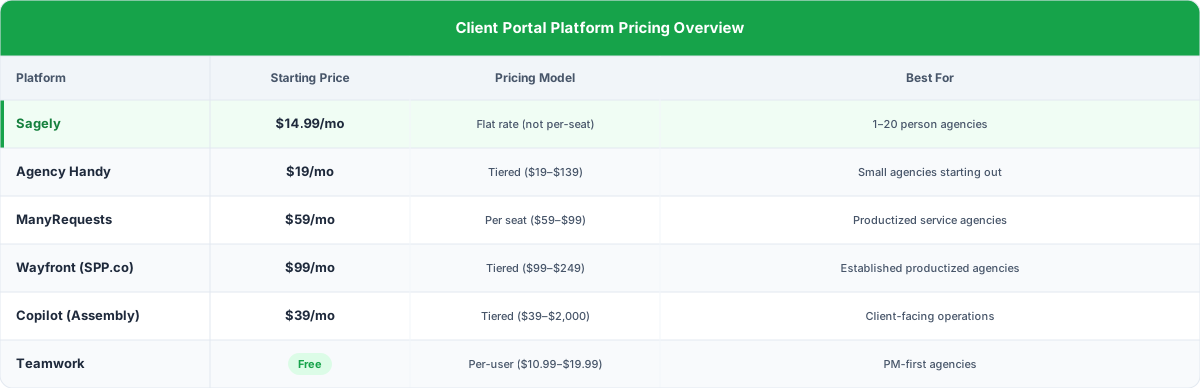
For a detailed comparison of these tools, check out our best client portal software for agencies breakdown.
6. Setup effort
How long does it take to go from signup to having your first client using the portal? If the answer is "a few weeks of configuration," that's a red flag. You're running an agency, not implementing enterprise software.
Look for tools you can set up in a day and start onboarding clients within a week. The longer it takes to set up, the more likely it never actually launches. For a step-by-step walkthrough, check out our client portal setup guide.
Features to look for
The features that matter most: passwordless (OTP) login, per-client access controls, structured request forms, retainer tracking, file delivery with versioning, white-label branding, and integrated messaging.
Beyond the basics, here are the features that separate agency-grade portals from generic client portal software:
OTP (passwordless) authentication. Your clients don't want to remember another password. One-time passcodes sent to email or phone make login frictionless. This is probably the single biggest factor in portal adoption. If logging in is annoying, clients won't come back.
Per-client access controls. Every client should only see their own projects, files, and conversations. This sounds obvious, but you'd be surprised how many portal tools treat multi-client access as an afterthought.
Request forms with structure. Not just a blank text box. Custom fields, file upload slots, dropdowns for request types. The goal is to capture enough information that your team can start working without a follow-up conversation.
Retainer and hour tracking. Clients should see their retainer balance, hours used, and what those hours went to. Your team should be able to log time directly against requests. This is where billing disputes die.
File delivery with version control. Upload deliverables, organize by project, maintain version history. Clients should be able to grab any file they need without emailing you.
White-label branding. Custom domain, logo, colors. The portal should feel like an extension of your agency, not a third-party tool.
Built-in or integrated messaging. Whether it's a native chat feature or an omni-channel inbox that pulls in Slack and email, client communication should live alongside the work it's related to.
Agency portal vs. freelancer portal vs. enterprise helpdesk
Freelancer tools lack multi-client management, enterprise helpdesks are built for support tickets, and agency portals are built for ongoing retainer relationships. Pick the category that matches your actual workflow.
One of the biggest mistakes agencies make is trying to use software that wasn't built for them. Let me break down why this matters:
Freelancer tools (like simple client portals built for solo operators) typically lack multi-client management, team collaboration features, and retainer tracking. They're great when you have 2-3 clients and no team. They fall apart at 8 clients.
Enterprise helpdesks (Zendesk, Freshdesk, Intercom) are designed for high-volume customer support. Ticket queues, SLA timers, customer satisfaction surveys. They can technically be used as client portals, but the entire UX is built around support ticket resolution, not ongoing agency-client relationships. You'll spend more time configuring the tool than using it. And your clients will feel like they're filing support tickets instead of working with their agency.
Agency-specific portals are built for the actual workflow: ongoing retainer relationships, multiple active projects per client, file delivery, branded experiences, and the kind of communication that's less "support ticket" and more "working together."
Here's a quick comparison:
CapabilityFreelancer ToolsEnterprise HelpdeskAgency PortalMulti-client managementBasicYes (but support-focused)Yes (relationship-focused)Retainer trackingRarelyNoYesWhite-label brandingSometimesLimitedYesRequest formsBasicAdvanced (support-focused)Agency-specificFile deliveryBasicNot coreYesPricing complexityLowHigh (per-agent)ModerateSetup timeMinutesWeeksHours to daysClient UXSimpleCorporateProfessional
If your agency is in the 1-20 person range with retainer clients, an agency-specific portal is almost always the right call. Enterprise tools are overkill. Freelancer tools aren't enough.
The right portal also depends on your agency type. If you run a digital agency, SEO shop, or creative studio, each has different needs. We cover the specifics in our guides for digital agencies, SEO agencies, and creative agencies.
How to implement a client portal (and actually get clients to use it)
Start with 2-3 pilot clients, walk them through the portal on a short call, then make it your default channel for all requests and status updates. Don't roll it out to everyone at once.
Here's where most portal implementations fail. Not in the setup. In the adoption.
You pick a tool, configure it, send clients a link, and then... crickets. They keep emailing you. They still send requests through Slack. The portal sits empty.
I've been through this. More than once. Here's what actually works:
Phase 1: Set up and test internally
Before you show a single client, use the portal yourself. Submit test requests. Upload test files. Make sure the client view actually makes sense from their perspective, not just yours.
Configure your branding, set up request forms for your most common work types, and connect your integrations (email, Slack, time tracking).
Phase 2: Start with your best clients
Don't roll it out to everyone at once. Pick 2-3 clients who are tech-comfortable and have a good relationship with you. Tell them you're investing in a better way to work together. Not "we're implementing new software." Frame it as a service upgrade.
Walk them through it on a short call. Show them how to submit a request, check status, and find files. Keep it to 10 minutes.
A solid client onboarding process makes this much smoother. We cover the full approach in our agency client onboarding guide.
Phase 3: Make it the default
This is the critical step. After your pilot clients are using the portal, start routing all communication through it. When a client emails you a request, respond with: "Got it! I've added this to your portal so we can track it properly. You can follow the progress here: [link]."
Do this consistently for two weeks. Most clients will switch over naturally. The ones who resist usually come around when they see how much easier it is to find files and check status without waiting for your reply.
Phase 4: Roll out to all clients
Once you've refined the process with your pilot group, extend to all clients. By this point, you'll know the common questions, the friction points, and how to frame the value.
The adoption cheat code
Want to know the one thing that guarantees adoption? Stop answering questions through other channels that the portal answers. When a client asks you for a status update via email, respond: "Great question. Check [portal link], it's all in there."
It feels uncomfortable at first. But within a month, clients stop asking. Not because you're being difficult, but because the portal is genuinely faster than waiting for your reply.
The real ROI of client portals
Agencies that implement portals properly see status update emails drop 70-80%, billing disputes nearly disappear, and client onboarding speed up significantly.
I'm not going to throw out some made-up ROI calculation. But here's what I've seen change in real terms when agencies implement portals properly:
Time saved on status updates: The "what's the status?" emails drop by 70-80% within the first month. For an agency with 10 clients, that's easily 5+ hours per week recovered.
Fewer billing disputes: When clients can see their retainer usage in real time, invoice pushback drops significantly. I went from having 2-3 billing conversations per month to almost none. If billing is a pain point, see our breakdown of payment processing in client portals.
Better retention signals: Having a portal makes your agency look more put-together than most competitors. It's a professionalism signal that clients notice, especially when they're comparing you to agencies that still run on email and shared folders.
Faster onboarding: New clients get access to their portal on day one. Files, communication, request submission, all of it is ready. No "I'll send you the Dropbox link" or "let me add you to Slack."
The client portal isn't a category of software. It's the operating layer between your agency and your clients. It's where client relationships actually happen day to day. If you want to understand the real numbers behind portal adoption, check out our client portal ROI analysis. And for a full checklist of what to look for, see our client portal features guide.
The portal is also where relationships actually happen. Not in the kickoff call. Not in the quarterly review. In the daily, boring, reliable space where your clients come to check on their work.
FAQ
What is a client portal for agencies?
A client portal for agencies is a secure, branded online space where clients can submit requests, track project status, access delivered files, view retainer usage, and communicate with your team. It replaces scattered email threads, Slack messages, and shared folders with a single organized system.
How much does client portal software cost for agencies?
Pricing ranges widely. Flat-rate options like Sagely start at $14.99/month. Per-seat tools like ManyRequests run $59-99/month per seat. Enterprise-adjacent tools like Teamwork charge $10.99-19.99 per user per month. For a 5-person agency, total costs can range from $15 to $500+ monthly depending on the platform and pricing model.
Do my clients actually need a portal, or is email enough?
For 2-3 clients, email might be fine. Beyond that, the cracks show quickly. Files get lost. Status questions eat your time. Scope creep goes untracked. Studies show 91% of customers would use self-service portals if available (Zendesk), and 40% actually prefer self-service over human contact (SuperOffice). Your clients want a portal. They just haven't told you yet.
What's the difference between a client portal and a project management tool?
Project management tools (Asana, Monday, Basecamp) are built for internal team workflows. Client portals are built for the client-to-agency interface. Some PM tools have client-facing features, but they typically expose too much internal complexity. A good portal shows clients exactly what they need (status, files, requests) without the noise of your internal task boards and team conversations.
How do I get clients to actually use the portal?
Start with 2-3 tech-comfortable clients. Walk them through it on a short call. Then make the portal your default, when clients email requests, add them to the portal and send the tracking link. Within a few weeks, most clients switch over because checking the portal is faster than waiting for your email reply.
Should I choose an agency-specific portal or a general helpdesk tool?
For agencies in the 1-20 person range, agency-specific tools are almost always the better fit. General helpdesks (Zendesk, Freshdesk) are designed for high-volume support ticket resolution, not ongoing retainer relationships. They require significant configuration to work for agency use cases, and the client experience feels more like "filing a support ticket" than "working with your team."