


Most client portal software wasn't built with your agency in mind. If you are a 5 to 50 person shop running 10 to 30 active client accounts, most "all-in-one" client portal apps either feel too basic or so heavy they need an implementation team.
The market splits into two camps: tools designed for solo freelancers (HoneyBook, Dubsado, 17hats) and enterprise platforms built for IT helpdesks and compliance-heavy industries (ServiceNow, Zendesk, Clinked).
When you try to run an actual agency on top of those, the cracks show fast. Freelancer tools hit a ceiling as soon as you have multiple team members and a mix of retainer clients with different needs. Enterprise tools demand long contracts, configuration projects, and client portal pricing that assumes a legal or finance department is making the call instead of a founder.
If you're running a client portal for agencies bolted onto a freelancer tool, you feel that ceiling the moment your client count climbs past five or six. No multi-client operational view. No team-level permissions. No retainer tracking. You end up duct-taping spreadsheets and Notion docs together, which defeats the whole point of buying client portal software in the first place.
Quick Answer: For most agencies (5 to 20 people, 10 to 30 retainer clients), Sagely and ManyRequests are the two client portal software tools built specifically for agency work. Sagely leads on Slack and email integration plus the multi-client dashboard. ManyRequests leads on billing and design or video proofing. Freelancer tools like HoneyBook and Zendo work for solo or micro-agencies but hit a ceiling as you grow.
What Client Portal Software Actually Does
Client portal software is a secure, branded workspace where your clients log in to track project progress, review and approve deliverables, share documents, communicate with your team, and receive invoices. It's the external layer of your operations, built separately from your internal project management tools.
That separation is the point. Your ClickUp or Notion workspace is built for your team: task assignments, internal notes, sprint planning. A client doesn't need to see any of that. Drop a client into your internal PM tool and you get two bad outcomes: you either overwhelm them with noise they don't understand or care about, or you spend time constantly managing their access and filtering what they can view. Client portal software solves this by building the client-facing layer separately.
What a full-featured client portal covers: a branded workspace clients log into, document storage with version control, approval workflows for deliverables, centralized client communication away from email, billing and invoicing, and project status visibility clients can actually parse. It is not a Dropbox folder with a login. It is not a Slack channel.
Core Features to Look For in Client Portal Software
Not every client portal app covers these equally. When you're evaluating options, here's what to actually look at.
Branded experience. Your clients should see your agency's logo, colors, and domain when they log in, not a generic portal with another company's badge at the bottom. Removing "Powered by X" is almost always locked behind a higher pricing tier. Factor that into your real cost, not the entry-level plan. A proper customizable client portal setup includes a custom domain (something like portal.youragency.com), branded email notifications, and client-facing consistency throughout. For what white-labeling actually involves at each tier, the white-label client portal for agencies guide breaks it down.
Approval workflows. This is where most tools fall short for agencies. An approval workflow isn't just "client signs the contract." For agencies, it means a client can review a deliverable, leave structured feedback, approve or reject it, with that decision tracked and timestamped. The cycle: deliverable submitted, client reviews, client approves or requests revision, decision recorded. If a tool's workflow model stops at e-signatures on onboarding documents, it's not covering the day-to-day delivery process.
Multi-client dashboard. A view showing all your active clients and their current status at once. Which clients have open requests? Which retainers are running low? Which approvals are stalled? This is a basic operational requirement for any agency managing more than a handful of active accounts, and it's where freelancer tools fall down. Their dashboards are built for a single pipeline, not for monitoring 15 concurrent client relationships.
Document and file management. Structured file storage per client, version control so you can pull up the right draft, and e-signature capabilities for contracts and SOWs. Some tools integrate DocuSign or Adobe Sign; others have native e-signature built in.
Communication thread. Centralized, contextual communication attached to projects or requests, separate from email and Slack. Not because those channels are bad, but because splitting client conversations across three channels means things get missed. The portal keeps communication in context.
Billing and retainer tracking. Recurring invoices, retainer balance visibility, and alerts when a client is approaching their monthly usage cap. This is the most underserved area in the category and one of the most important for agencies running retainer-based engagements.
What Agency-Specific Needs Most Tools Miss
Here's where the category specifically lets agencies down.
- Multi-client management at scale. Freelancer tools like HoneyBook are designed for one owner managing their own pipeline, not an account manager watching 12 retainer clients at once. You need a view that shows open requests, retainers near capacity, and anything stuck waiting on a client in one place.
- Team permissions that actually separate your team from your clients. Your team needs full visibility into all client accounts, internal notes, and billing. Clients should only see their own portal. Many tools offer a crude permission model, which either exposes internal information or locks team members out of what they need.
- Per-client branding. Some agencies want each client to experience the portal as distinctly theirs: their colors, a subdomain using their brand name, email notifications that look like they came from the agency. That level of per-client customization is rare below enterprise pricing, but for relationship-driven agencies it matters.
- Retainer and capacity visibility. If a client is on a 20-hour monthly retainer and your team has logged 18 hours by the 15th, you need to know that before month end, not after. Retainer health visibility is rare. ManyRequests surfaces it as a core feature. Sagely tracks it with usage alerts. Most others do not.
Client Portal Software vs. Other Tools
Several adjacent categories overlap with client portals. Here's how they actually differ.
- vs. Project management tools (ClickUp, Asana, Basecamp). PM tools manage your team's internal work: tasks, deadlines, dependencies. They're not built for external client access. You can share a view with a client, but you're working around the tool's design. No branded client login, no client-specific approval workflows, no retainer tracking.
- vs. CRM software (HubSpot, Pipedrive). CRMs track leads and sales pipeline, optimized for closing deals. Once a client is onboarded, a CRM stops being the right tool. Confusing it with a client portal is one of the most common "we already have a tool for that" mistakes agencies make, and the result is ongoing client communication still happening in email.
- vs. Helpdesk software (Zendesk, Intercom). Helpdesks are built for high-volume, anonymous support tickets. They work for SaaS companies with thousands of customers and repetitive requests. For an agency with 15 clients expecting personalized, ongoing project relationships, helpdesk software adds overhead without fitting the workflow. Wrong shape for the job.
- vs. File storage (Google Drive, Dropbox). File storage is one piece of what a client portal does. Google Drive has no approval workflows, no communication layer, no billing, and no branded client login. Sharing a Drive folder is a workaround that holds until you need anything beyond storage.
A quick checklist for choosing client portal software
Before you move clients into a new tool, check three basics:
- Can you give clients a branded, customizable client portal on your domain?
- Does one dashboard show active clients, retainers, and open approvals?
- Does the client portal pricing still make sense once you add real headcount and the tier required for white-labeling?
If a tool cannot clear those, it will not magically get better six months in.
How the Main Options Compare
The best client portal software for agencies article goes into more depth on each.
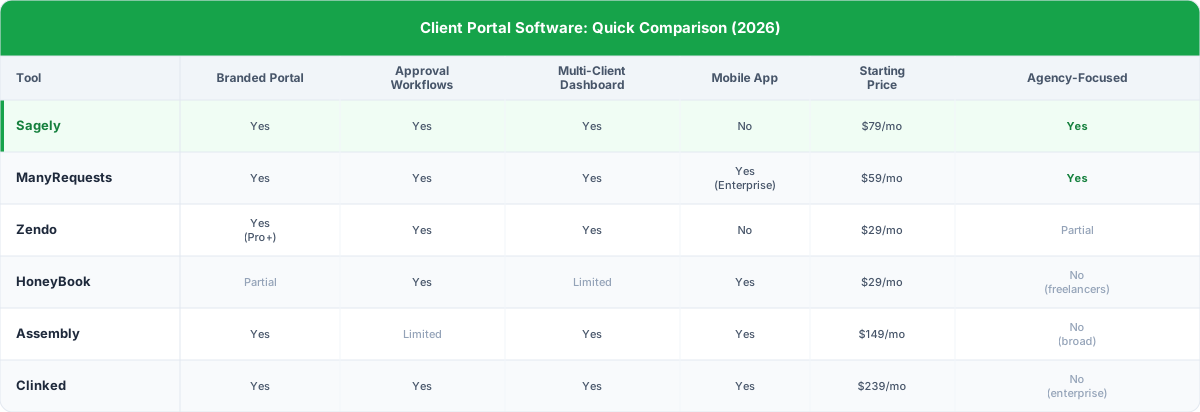
Sagely and ManyRequests are the only two tools here built specifically for agency work. Everything else serves a broader audience: freelancers (HoneyBook), general professional services (Assembly), or enterprise compliance (Clinked). Sagely is the only one that combines multi-client dashboard, structured approval workflows, retainer tracking, and email-plus-Slack integration in one product.
How to Choose: Client Portal Pricing by Agency Size
The right tool depends on your team size, your client volume, and what's actually failing in your current setup.
- Solo or micro agency (1 to 3 people). You're managing 5 to 10 active clients and mostly running it yourself. HoneyBook at $29/mo or Zendo's Core plan at $29/mo cover the basics: client portal, invoices, contracts, communication. The multi-client management and retainer tracking gaps won't bite at this scale. Zendo has a free plan worth testing first.
- Growing agency (5 to 20 people). This is where freelancer tools start to crack. Multiple account managers, 15 to 30 active retainer clients, operational complexity that a single-person pipeline tool wasn't designed to absorb. At this stage, you need a proper multi-client operational view, team-level permissions, retainer tracking, and Slack or email integration so clients don't have to change how they reach you. Sagely ($79/mo, unlimited clients, up to 15 team members) and ManyRequests ($59/mo Core, $99/mo Pro) are both designed for this. ManyRequests has stronger billing tooling and native design and video proofing. Sagely has better channel integration for agencies that need to meet clients where they already are.
- Larger agency (20+ people). At this scale you need API access, a platform that handles 50+ accounts, and potentially a white-label mobile app. ManyRequests Enterprise covers the mobile app but starts at $1,000/mo. Assembly Professional at $149/mo is worth evaluating for complex custom workflow needs (API, custom apps, SDK). Clinked at $239/mo fits document-heavy, compliance-driven work.
Frequently Asked Questions
What is client portal software?
It's a secure online workspace your clients log into to see project status, review and approve deliverables, share documents, communicate with your team, and receive invoices. It replaces the combination of shared drives, email threads, and Slack messages that most agencies rely on for client communication, and brings everything into one branded, organized place.
What's the difference between a client portal and a project management tool?
Project management tools like ClickUp or Asana are designed for your internal team. They manage tasks, deadlines, and workflows across your people. A client portal is the external layer: what clients log into to see progress, review work, give approvals, and communicate with your team. Some agencies use both. The PM tool runs internal delivery; the client portal manages the client relationship.
How much does client portal software cost?
Client portal pricing ranges from free (Zendo's entry plan) to $239/mo and higher (Clinked). For agency-tier tools with full features, expect $59 to $149/mo for the base plan, with per-seat costs on top for larger teams. Sagely is $79/mo for unlimited clients and up to 15 team members. ManyRequests Core is $59/mo, Pro is $99/mo. Assembly Professional is $149/mo for three users. Most tools charge separately per additional team member seat, so factor that into your real cost comparison.
Can I white-label a client portal?
Yes. Most client portal apps support some level of branding: your logo, your colors, and a custom domain like `portal.youragency.com`. Removing the tool's branding badge is usually locked behind a Pro or Agency-tier plan. Full white-label, where clients never see any mention of the underlying tool, typically requires enterprise pricing. Custom domain access is more commonly available at mid-tier plans.
What's the best client portal software for agencies?
For retainer-based agencies with design or video deliverables, ManyRequests is purpose-built for that model. For agencies focused on ongoing client relationships with Slack and email integration, Sagely is the strongest fit. For smaller teams or solo operators on a budget, Zendo and HoneyBook are cost-effective starting points. See the full [agency client portal comparison](/best-client-portal-software-for-agencies) for a tool-by-tool comparison with more detail.
Sagely (getsagely.co) was built because no portal understood how agency work actually flows. It gives your agency a branded client workspace, structured approval workflows, a multi-client operational dashboard, retainer tracking with usage alerts, and email-plus-Slack integration so clients reach you the way they already do. If you're ready to replace the folder-sharing and email chains with something built specifically for agency work, the client portal setup guide walks through how to get it running.