


Client Portal Features Every Agency Needs: A Checklist
Most client portal tools will show you a feature list that looks a mile long. Dozens of checkmarks, each one designed to make you feel like you're getting everything. And then you buy it, set it up, and realize that half those features are things you'll never use and the three you actually need are missing.
I've been through this cycle. You sign up for a portal because it has a nice UI and 40 integrations. Six weeks later, your clients still can't find their files, nobody remembers the password, and you're back to email threads.
This is a checklist of client portal features you should be evaluating, split into must-haves and nice-to-haves, with a quick explanation of why each one matters. Use it when you're comparing tools or building a requirements doc.
For the broader picture on portals, check out our complete guide to client portals for agencies. If you're ready to compare specific tools, start with the client portal software comparison.
A client portal features checklist is a prioritized list of must-have and nice-to-have capabilities that agencies use to evaluate portal software, covering communication, project visibility, retainer tracking, security, integrations, and client experience to find the right fit for their workflow.
Essential communication features
These are the non-negotiables. If a portal doesn't have these, it's not a portal. It's a project dashboard with a login screen.
Unified inbox (must have)
Your clients message you through Slack, email, the portal, and occasionally WhatsApp. A unified inbox pulls all those channels into a single conversation thread per client, so your team isn't checking five apps to piece together what a client said.
Without this, you end up with a portal that adds another channel instead of consolidating existing ones.
Sagely's omni-channel inbox handles Slack, email, and portal messages in one thread. Most other portal tools only capture messages sent through the portal itself.
Request tracking (must have)
Clients need a way to submit requests through the portal in a structured format, not free-text emails where "a few quick changes" turns into 14 hours of unscoped work.
Good request tracking captures details upfront (request type, priority, attachments, deadlines) and gives both sides visibility into the status. For more on request workflows, see our request management guide.
Status visibility (must have)
Your clients want to check project status at 10pm on a Tuesday without emailing you. That's the whole point. If the portal doesn't give them clear, real-time visibility into what's in progress, what's done, and what's queued up, you haven't solved the problem. You've just moved it to a different URL.
40% of consumers prefer self-service over human contact. Status visibility is the single biggest reason clients actually use a portal. Get this wrong and adoption dies on day one.
Notifications (must have)
Both sides need to know when something happens. Client submits a request? Your team gets notified. You deliver a file? The client gets notified.
Plenty of portal tools either over-notify (every tiny action triggers an email) or under-notify (feedback sits unseen for days). Look for controls that let you configure what triggers alerts and through which channels.
Agency-specific features
Retainer tracking, native time tracking, and per-client permissions are the features that separate agency portals from generic helpdesk tools. Most portal software, built for IT departments or support teams, doesn't have them.
This is where generic helpdesk tools fall apart. These features only matter if you run an agency. Which is why most portal software, built for IT departments or customer support teams, doesn't have them.
Retainer tracking (must have for retainer agencies)
If you run monthly retainers, this is non-negotiable. Clients need to see how their hours are being used. "40 hours used out of 40" with a task-level breakdown makes the invoice a non-event. Zero visibility into usage is where billing disputes start.
Sagely has native retainer tracking that ties directly to time entries. Most competitors either lack it entirely or bolt it on through integrations that require manual syncing.
Time tracking (must have)
Time tracking should connect to the work, not live in a separate spreadsheet. When a team member logs time on a ticket, it should automatically update the retainer balance and generate accurate reports. Manual tracking leads to 20-30% of billable time going untracked.
Look for time tracking that lives inside the portal, not as an add-on you pay extra for.
Client-level permissions (must have)
Client A should see their projects and nothing else. Your internal team needs different access levels (admin, manager, team member). And some clients may have contractors or stakeholders who need view-only access.
This sounds obvious, but the implementation varies widely. Some tools handle permissions at the workspace level (everyone in the workspace sees everything). For agencies managing 10-20 clients, that doesn't work. You need per-client data isolation, which also ties into portal security.
Client experience features
The best features won't matter if clients won't log in. Remove friction with passwordless authentication, mobile responsiveness, easy file access, and a branded portal design.
You can have the best features in the world and it won't matter if your clients won't log in. This category is about removing friction from the client side.
OTP login / passwordless auth (must have)
Traditional username/password login is broken for client portals. Clients forget passwords, reuse them (a real security risk), and half never bother creating an account at all.
OTP authentication eliminates this. Client enters their email, gets a code, and they're in. No account creation. No password resets. Sagely is the only agency portal using OTP by default. For more on why this matters, see our portal security guide.
Mobile responsive (must have)
Your clients will check their portal from their phone. At dinner. On the train. In a meeting they're pretending to pay attention in. If the portal isn't usable on mobile, they'll default to texting or emailing you instead, which defeats the purpose.
File access (must have)
Clients need a simple, persistent place to find their files. Deliverables, assets, contracts, brand guidelines. No hunting through email threads, no "can you resend that?" If a client delivered feedback on a design three months ago, they should be able to find it.
Branded experience (nice to have)
A white-labeled portal with your logo, colors, and custom domain reinforces your professionalism. It makes the portal feel like part of your service, not some third-party tool you bolted on. This matters more for agencies positioning themselves as premium. For smaller shops, it's a nice touch but not the thing that'll make or break adoption.
Slack integration (must have if you use Slack)
If your team lives in Slack, the portal needs to meet you there. Some tools do basic Slack notifications. Others, like Sagely, are Slack-native, meaning you can manage portal tickets directly from Slack without switching tabs. There's a meaningful difference between "sends you a notification" and "lets you work from Slack."
Email integration (must have)
Clients who prefer email should be able to reply to a portal notification and have that reply appear in the portal thread. Two-way email sync prevents the portal from becoming a separate channel that doubles your communication overhead.
Calendar integration (nice to have)
Syncing portal deadlines to Google Calendar or Outlook keeps timelines visible without requiring your team to check the portal constantly.
Billing tool integration (nice to have)
Connecting your portal to Stripe, QuickBooks, or FreshBooks so invoices and retainer balances stay in sync. Some portals have native invoicing (Agency Handy, Wayfront). Others connect via API or Zapier.
Security features
Security isn't glamorous, but it determines whether your portal is a trusted system or a liability. These aren't optional.
Encryption (must have)
TLS encryption in transit (HTTPS) and AES-256 encryption at rest. Both. Every tool on the market should have this, but verify rather than assuming.
Data isolation (must have)
Client A should never see Client B's data. Some tools use shared database architectures where isolation is handled by application logic rather than infrastructure. Ask your vendor directly how client data is separated.
Audit logs (nice to have, must have for regulated clients)
Audit logs record who accessed what and when. For most small agencies, they're useful but not essential. If your clients work in healthcare, finance, or legal, audit logs become a requirement because their compliance frameworks demand them.
Compliance certifications (nice to have for most)
SOC 2, HIPAA, GDPR compliance. Assembly (formerly Copilot) stands out here with SOC 2 and HIPAA certifications. Most agency portals don't have them. If your clients handle sensitive data (healthcare, financial services), this feature jumps from "nice to have" to "you can't win the contract without it."
Analytics features
These tell you whether the portal is actually working or just existing.
Usage reports (nice to have)
Which clients are logging in and which aren't? If a client hasn't logged in for three weeks, that's a signal. Usage data shows you where adoption is strong and where you need to follow up.
Response time tracking (nice to have)
How fast is your team responding to portal requests? Useful for internal management and for showing clients you're meeting SLAs.
Adoption metrics (nice to have)
Are clients submitting requests through the portal or still emailing? Are they checking status updates or calling? These metrics help you figure out where training gaps exist.
Feature comparison: who has what
Here's how six portal tools stack up across the features that matter for agencies. This isn't every feature each tool offers. It's the features from this checklist, mapped to each product.
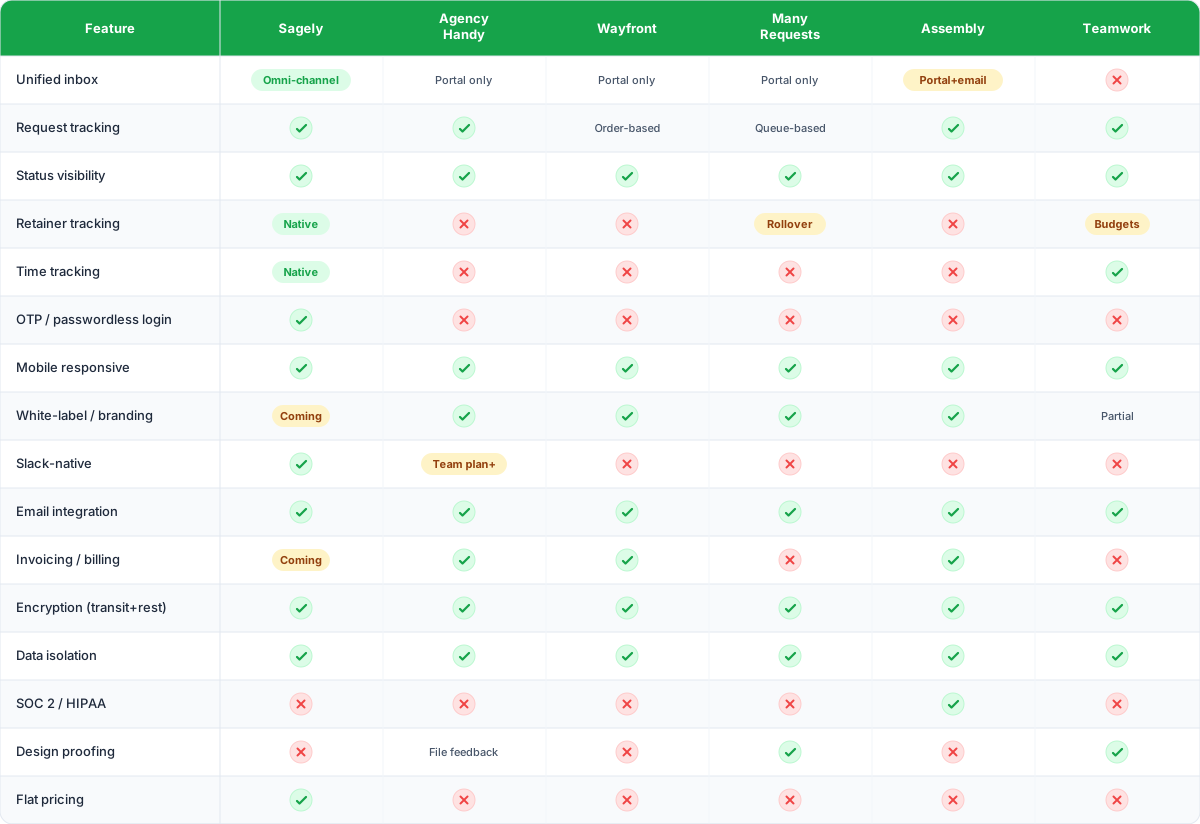
For detailed reviews of each tool, see our full software comparison.
How to use this checklist
Start with the must-haves. If a tool is missing one, it's out. Don't let a nice UI or cheap price distract you from a missing essential.
Weight the nice-to-haves by your actual workflow. White-labeling matters more if you charge premium rates. SOC 2 matters more if you serve healthcare clients.
And test with a real client, not a demo account. Sign up for a trial and run one actual client through the portal. Can they log in without help? Can they find their files? Do they actually use it? If a portal fails that test, nothing else on the checklist matters.
FAQ
What are the most important client portal features for agencies?
A unified inbox, request tracking, status visibility, and retainer tracking are the essentials for retainer-based agencies. OTP (passwordless) login is the single biggest factor in whether clients actually use the portal. Without frictionless authentication, adoption drops significantly because clients default to emailing you instead of logging in.
Do I need a white-label client portal?
It depends on how you position your agency. White-labeling reinforces your brand and makes the portal feel like your product, not a third-party tool you bolted on. For premium agencies charging higher rates, it matters. For smaller shops still building their client base, it's a nice-to-have but not a dealbreaker.
What security features should an agency client portal have?
At minimum: TLS encryption in transit, AES-256 encryption at rest, per-client data isolation, and passwordless or multi-factor authentication. If your clients are in healthcare or finance, look for SOC 2 or HIPAA compliance. Read our [security deep-dive](/post/client-portal-security-for-agencies) for the full picture.
How do I get clients to actually use the portal?
Authentication friction is the number one adoption killer. OTP login removes the biggest barrier (passwords). Beyond that, make the portal the *only* place clients can check status and access files. If they can still get everything by emailing you, they will. For implementation tips, check out our [setup guide](/post/client-portal-setup-guide).