
Social Media Client Onboarding Template: AI Ready Fillable PDF (2026)
Starting a new social media client without a clear onboarding process creates predictable problems: chasing account access in week two, finding out the brand guidelines are buried in a Google Drive nobody can locate, and realising halfway through month one that the client expected weekly reports and you have been sending monthly summaries.
This template gives you a structured document to complete with every new social media client before work begins, so access, assets, goals, approvals, reporting, and communication are all agreed in writing from the start.
What the template covers
The template has six sections, each covering a distinct area of the client relationship. The most effective way to use it is to walk through it together on your onboarding call and fill it in live, rather than sending it as a form for the client to complete independently.
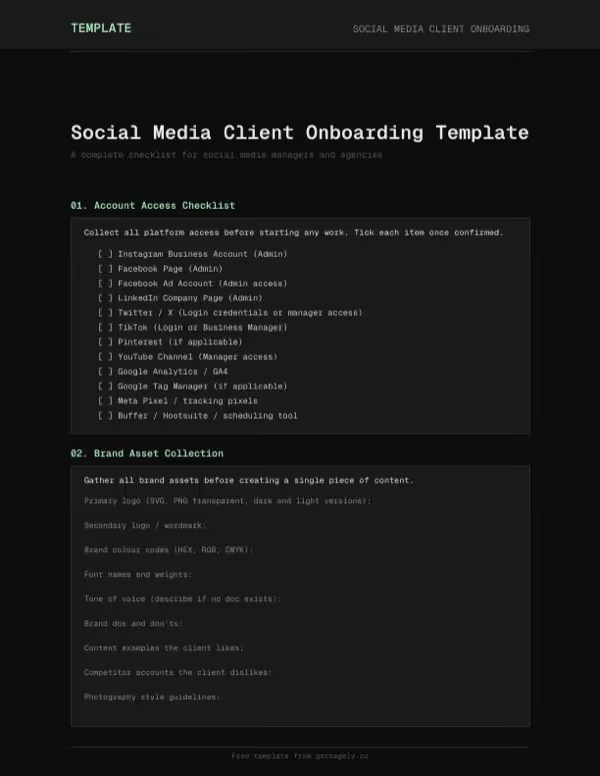
Account access
Records every platform the agency needs access to: Instagram, Facebook, LinkedIn, TikTok, Twitter/X, Google Analytics, ad accounts, and any scheduling tools the client already uses. For each platform, the template captures whether admin-level access is required, which person on the agency team will hold that access, and the expected handover date.
Getting account access documented before work starts removes the week-one scramble for login details and two-factor codes. It also surfaces blockers early. If a previous agency holds admin access on the client's Facebook Business Manager, or if the client has never set up a LinkedIn Company Page admin, you want to know that before a campaign deadline appears.
Brand assets
Captures what the agency needs to represent the brand consistently: logo files (with format and colour variants specified), the colour palette, typography, brand voice documentation, tone of voice guidelines, and any explicit do's and don'ts the client wants applied to social content.
Many agencies work for months before realising they have been using an outdated logo or a brand colour the client updated six months ago. Completing this section creates a shared reference point at the start of the relationship so there is no ambiguity about which assets are current, which are approved for social use, and what the brand standards require.
Goals and KPIs
Records the agreed performance targets for the engagement: follower growth, engagement rate, reach, and any campaign-specific KPIs tied to paid activity or specific content pushes. Each metric is linked to a reporting frequency so both sides understand how and when performance will be assessed.
Vague goals create disputes about whether the work is succeeding. This section forces a specific conversation about what good performance looks like before the first post goes live, and documents the outcome so there is a written record to refer back to if targets are questioned later in the engagement.
Approval workflow
Defines who approves content on the client side, how long they have to provide approval or feedback, which channel they use to communicate changes, and what the process is when approval does not arrive within the agreed window.
Without a documented approval workflow, content often stalls because the right person was not looped in, or it gets approved by whoever responds first rather than whoever has actual sign-off authority. The template records the primary approver, any additional stakeholders who need to review, the turnaround window, and how late or missing approvals are handled.
Reporting preferences
Captures how the client wants to receive performance data: report frequency (weekly, monthly, quarterly), the format (PDF summary, live dashboard, slide deck), which metrics to include, how the report is delivered, and who receives it on the client side.
Reporting preferences vary more than most agencies expect. Some clients want a one-page monthly summary; others want weekly numbers and access to a live dashboard. Assumptions in this area tend to create friction over time. Getting preferences documented at onboarding avoids producing reports nobody asked for, or fielding requests for data that was never captured.
Communication rules
Sets out the operating agreement for the day-to-day relationship: who the primary and secondary contacts are on both sides, expected response times, preferred channels (email, Slack, WhatsApp, phone), working hours, and the escalation path if something time-sensitive comes up.
This section prevents the common pattern where clients message multiple people on the agency team and get inconsistent responses, or send urgent requests on channels the team does not monitor regularly. It also protects the agency: if a client sends last-minute changes outside agreed working hours, having documented communication rules provides a clear reference point when managing expectations around response times.
Who this template is for
Social media managers and agency teams taking on new clients. Works for full-service social retainers, platform-specific engagements, and project-based campaign work.
The template is most useful when completed live during an onboarding call rather than sent as a standalone form, because it generates the kind of clarifying conversation that prevents problems later.
Why onboarding structure pays off early
The first two weeks of a new social media engagement tend to set the pattern for the whole relationship. When onboarding is ad hoc, things get missed, expectations diverge quietly, and the agency spends energy chasing basics instead of doing the work.
A consistent onboarding process takes the same time as an informal one but produces a much cleaner starting point and a written record both sides can refer back to when questions come up.
How the AI-ready format works
All six sections are bookmarked, so you can point an AI tool directly to Account Access, Brand Assets, Goals and KPIs, Approval Workflow, Reporting Preferences, or Communication Rules without loading the whole document.
- Named bookmarks: Each section has a structured anchor so AI tools can locate and extract specific parts of the onboarding document without processing the full file.
- Embedded schema: Every checklist item and input field is mapped in the document schema, so AI tools can parse what has been completed, what is still blank, and what each field represents in context.
- Document metadata: The template includes metadata for template type, primary use case, and relevant keywords, making it easier for AI tools to categorise and retrieve the document accurately.
Try asking an AI: "What's missing from our current onboarding process compared to this template?"
These contracts are provided as examples only and do not constitute legal advice. By downloading, you agree to use them at your own discretion and accept that we bear no responsibility for how they are used.